Category: Blog Post (EN)

AI_feelings_survey

We asked our staff what feelings AI evokes – here’s what we learned

“Everyone must start using AI tools, beginning today.”
“You do already have Claude Code, right?”
“Learn to make AI tools part of your workflow.”

These sentences have surely been heard in every company that works with technology. But what about change management? How do you account for the individuals who no longer recognize their own roles as the same ones they had just a year ago? Or a work community grappling with new ways of working amid constant change?

At Identio, we paused to sit with these questions when our occupational safety and health committee discussed the topic and brought it to the People & Culture Taskforce, which develops company culture and people’s wellbeing. In this piece, I’ll share what we found when we asked our staff about the feelings and thoughts that AI brings with it.

We surveyed our staff already last autumn, mapping the use of AI tools in client projects and internally. That survey focused on the tools, their use cases, and how the company can support people in using AI tools. This spring we ran a second survey, one more closely tied to the very perspectives I just mentioned — the feelings and thoughts AI brings with it. This survey did not assess competence or rate of adoption, since those themes had already been the focus earlier. We wanted to make room for honest reflection, because we believe that’s a prerequisite for healthy change.

Curiosity is the strongest emotion and it says a lot

We received responses from 60% of Identio’s people. A higher response rate would have given an even more reliable overall picture of our situation, but even this result offers enough direction for further discussion and action.

Nearly all respondents (93.8%) described their relationship with AI using the word “curious.” That’s a strong starting point. People want to learn, experiment, and be part of the change.

Alongside curiosity, other emotions appeared too: uncertainty, enthusiasm, and confusion. Most chose more than one option, with the most common emotion combinations being “enthusiastic and curious,” “curious and uncertain,” and “curious, enthusiastic, and confused.”

This result is no surprise. In the end we’re only human, with all our emotions, and when the nature of work changes quickly, parallel and even contradictory feelings are a normal reaction. They occur in every organization, regardless of whether they’re talked about or not. The only question, then, is whether space is created to process them or not. AI can be seen as both inspiring and pressure-inducing at the same time. Both feelings are valid, and at our company they have room to coexist – even though AI has been raised as one of the central growth drivers of our strategy.

What’s on people’s minds, and why that’s a good sign

Respondents’ reflections fell roughly into three themes.

Work and career
Will writing code decrease? Will the work turn into reviewing AI-generated code? Will I get the same sense of accomplishment from problem-solving as before?

Society and ethics
AI’s impact on factors such as data security, misuse, and the environment. Does everyone have equal access to AI tools?

Wellbeing
Will conversations with colleagues – and the back-and-forth of ideas and thoughts – decline as discussion shifts to AI tools? And what happens to cognitive load?

We think these concerns and questions are not signs of resistance to change, but signs that people care about their work, their professional skills, and the world around them. Those are exactly the kind of people we want working with us.

What people haven’t said out loud

We also asked Identio’s people which things they hadn’t said out loud in the public conversation.

With this question, a natural reflection recurred about where each person’s AI skills stood relative to their colleagues. At Identio, every employee uses AI tools according to the client’s guidelines, and some already do their work entirely AI-natively.

We’ve organized plenty of training and knowledge-sharing opportunities precisely so that we stay aware of one another’s skills and ensure a high level of AI competence across our work community. If a consultant isn’t able to use AI tools on their project, we make sure they get extra support to learn those skills.

What’s next?

The survey results won’t be left in a drawer. Our People & Culture team has already planned concrete actions: clearer guidelines for using AI in client work and internally, shared learning practices and peer support, and regular forums where AI-related feelings can be discussed openly. We’ll also make sure that support reaches internal roles in addition to consultants. Leadership actively backs initiatives related to developing AI competence, which ensures that things don’t stay at the level of talk alone.

Part of change management is recognizing that, beyond information, people need space to process change. That’s slower than adopting a new tool, but it’s the only way change becomes sustainable. Different emotions don’t make people resistant to change – or, in this case, contradictory feelings don’t make people anti-AI.

As a work community, we’re committed to our shared strategic guidelines and goals, including in the realm of AI. We want to do it in a healthy and sustainable way.

We believe no one gets through this change alone and no one has to.

Interested in Identio as an employer? Check out our open positions 👉 https://www.identio.fi/careers

50 x faster development with AI tools

5x or 50x – why buying an AI license isn’t enough

You may be wondering whether using AI tools in software development brings real added value. We looked into the results of one of our consultants’ long-term client projects, and they were eye-opening. Not because AI adds value in software development, but because of how much AI tools can boost the work of a true professional.

Here’s the critical point that many people get wrong: it’s not enough to acquire an AI license and put the tool into use. That’s a start, of course, but it doesn’t produce results on its own. The multifold improvement in productivity comes from how the model is integrated into the everyday reality of development work.

The analysis highlighted three separate projects in which a developer used the same language model, but with very different results. In a modern Laravel project, productivity was as much as 20–50 times higher per individual feature. In an old legacy monolith, the benefit was smaller, but still clearly significant. Overall, the developer estimated being roughly five times faster than without AI tools.

The benefit depends on the environment and capabilities

Our developer leveraged three key things:

RAG (Retrieval Augmented Generation). The AI reads the project’s documentation, architecture, and coding conventions before generating anything. This lets us onboard the AI to understand the system instead of having it guess. This way, we can significantly reduce hallucination.

Explicit rules. The development team has written guidelines that tell the AI how things are done in this project. They cover folder structures, coding standards, and architectural patterns. It’s like onboarding a new developer, but it can be done instantly and all at once.

MCP tools. MCP, or Model Context Protocol, is a standard developed by Anthropic that seamlessly connects AI models (such as Claude) to external tools, databases, and APIs. It means the AI doesn’t just write code, but works directly with other systems. It reads databases, performs operations, and integrates into the production environment. New MCP tools can be built in minutes.

MCP solves the problem where even the most advanced AI model is effectively isolated from a company’s systems. Previously, every connection had to be built separately. MCP is like a shared plug – once it’s in use, new connections are created in a fraction of the time.

What does this mean for pricing and resourcing?

Here lies the question that public discussion doesn’t always dare to raise: if a developer is 5–50x faster, what follows from that? Should a consulting firm bill less, or should the client need smaller teams?

Our view is that an AI-native developer produces more business value in the same amount of time. The client gets more results – not just more lines of code.

A developer who knows how to build context, write AI rules, and leverage MCP integrations doesn’t simply write code faster. They operate on a different level than before, and this amounts to an entirely different role. For now, the client is the one who gets more for the same money. I’m comparing this, of course, to the time before AI tools. Consultants’ hourly billing rates may have risen by a few euros, but in the big picture, the client is the one who benefits most from the situation.

What does this mean for the client?

Based on the analysis, another opportunity also emerged – one we’ve already noticed with our other consultants as well: our consultants can help clients analyze their other systems, identify automation opportunities, and adopt AI-assisted workflows more broadly. This is consulting that wasn’t on the table before, and it delivers value to the client on top of traditional development work.

This is the shift now happening faster than we were able to imagine before. AI doesn’t replace developers, but developers who know how to use AI tools and language models correctly do things others can’t. And they are also the ones whose expertise is most sought after among our clients.

That’s why we at Identio have made AI part of our strategy. We see it as a key driver of growth, and every one of our consultants must master these tools and workflows. We invest in our consultants’ AI expertise regardless of whether their current client projects allow the use of AI tools. This way, we can ensure we’re able to offer our clients the best possible expertise for leveraging AI.

What’s next?

If you’re interested in what AI-native development could mean for your projects or your team, let’s talk. We’re happy to give an honest assessment of where AI could genuinely be useful in your project. And naturally, we can also tell you what kinds of environments and situations it shouldn’t be used in.

Identio is a technology company specializing in consulting. We use AI tools in our work, and every one of our consultants knows how to use them effectively in their own work. Our promise is that our consultants deliver value from day one.

claude code x figma

Claude Code × Figma – when code and design speak the same language, you get results faster

Design and code in different worlds

How many meetings does it take for a developer to build exactly what the designer intended? In most teams, the answer is: too many.

This isn’t due to carelessness or lack of skill. In most organizations, design and code simply live in different places: the design team in Figma, the development team in a code editor and between them flows a constant stream of meetings, comments, and tickets. Slow, and often unfortunately inefficient for both sides.

A pilot at a large Finnish company

We ran an AI pilot for a large Finnish company whose situation was a familiar one: design lived in Figma and implementation in code, with no smooth connection between the two. Iterations were made slowly, mediated by people, from one meeting to the next.

We set out to test one concrete question: could Claude Code and Figma together shorten this distance?

In practice, this meant the following: we took an existing view from the code into Figma and, on that basis, designed a new view that hadn’t yet been coded. Using Figma’s MCP Server, Claude Code generated a working React implementation from it. We validated the solution together with the client by going through the code, the time the implementation took, and the benefits it brought.

Beyond the obvious things – increased speed and a shortened design-to-development cycle – the resulting outcome matched the design perfectly, without the typical changes that creep in during coding. The distance between design and code shrank, and the end result genuinely matched the design that had been intended.

How does the workflow work in practice?

The process can start from either code or design. Typically from code: Claude Code builds the view as a React implementation, roughly but functionally. Through Figma’s integrations, it’s brought into Figma, where the designer sees the actual view rather than a separate mockup.

In Figma, the layout, typography, and colors are edited without anyone needing to touch the code. The changes flow back to Claude Code, which updates the implementation. The developer isn’t left guessing what the designer meant – they see it directly.

A springboard, not a revolution

While the workflow is admittedly genuinely impressive, it still won’t change everything. Designers’ and developers’ jobs remain secure going forward, even though faster collaboration will surely save time and make work more efficient.

This process is, however, a step toward a situation where design and code aren’t separate, disconnected files. A common language is found without anyone having to learn a new tool or give up an old one.

I’d especially like to challenge those teams where the line between design and code has always been clear and firmly in place. Try out what happens when a designer and a developer can look at and talk about the same thing, with no gap between them.

Where does this work best?

At Identio, we’ve noticed that the workflow between Claude and Figma works best in situations where design and development teams are used to operating separately. Building a design system or component library is also a natural starting point – though, when doing so, a clear understanding of who owns the design system needs to be front of mind.

And the workflow also works when the designer happens to be the person responsible for both design and implementation – a role that technically proficient designers will increasingly fill in the future.

Caveats

The code Claude Code generates needs to be reviewed. It doesn’t always know when it’s wrong, and it can be wrong very convincingly. Synchronization between Figma and code doesn’t work seamlessly in every situation, and in places that require accessibility or other precision, manual work may still be needed.

This doesn’t change what the AI pilot also demonstrated, though: the barrier to getting started is lower than ever, and that’s an excellent foundation for adopting new AI-assisted workflows.

Let’s try it together

We have experience with this workflow from both client projects and our own pilots. If you’d like to find out how it would fit your situation, get in touch and let’s think it through together!

This is how we make salary decisions at Identio

This article is a follow-up to our earlier blog post, where we explained how we handle career development discussions at Identio. Salary discussions and raise decisions are a separate process for us, even though they’re timed to link up with the career development cycle. I wanted to write a completely separate post about it, so that the whole picture might feel a bit clearer to you.

In many companies, the process behind salary raise decisions could be more transparent. The criteria may be a little vague, and the outcome can feel arbitrary. That’s why salary discussions can be frustrating experiences. I won’t claim our model is perfect or that it only produces excellent outcomes, but we’ve wanted to make it as transparent as possible.

In this article, I’ll walk you through how we at Identio make salary raise decisions and what factors go into them.

The process: we review salaries twice a year

At Identio, salaries are reviewed twice a year, always at the end of the career development cycle, in spring and autumn. This isn’t a promise of a raise but a process that runs regardless of whether you ask for one or know how to negotiate well enough.

We humans are quite different from one another. For some, asking for notably large raises comes easily, while for others negotiating is awkward and stressful. Of course, in our model too a raise often starts from the employee themselves, but that’s not the only deciding factor.

Salary decisions are currently made by the company’s leadership. The criteria are transparent, and next I’ll explain all the things that influence leadership’s decision-making.

Self-assessment and reviewing feedback

Before leadership makes any decision, you assess your own performance against clear criteria. These criteria cover areas related to your work, such as technical skills, client feedback, independence, collaboration, and your own development. Every role from developer to designer, and from sales to marketing, is assessed on the same principles, but with role-specific expectations.

The most important thing in the self-assessment isn’t the number but how you justify your own assessment. What have you done? What has gone well? Where would you like support? The written assessment explains how you arrived at the number you gave. It’s also worth noting that the number doesn’t only measure your skills, but also the impact your skills have.

Before you send your self-assessment on to leadership at the end of the career development cycle, you go through it with your pod. This is an important and deliberate step, because it helps you gauge whether you share the same view as your pod members. Are you being too modest? Or perhaps a little optimistic? Your colleagues, who see your daily work up close, are often the best people to answer this and to offer valuable perspective.

At the same time as the self-assessment forms are being worked on, everyone should also, by this point at the latest, gather feedback on their own work. You can ask for feedback from clients, colleagues, and internal teams. Leadership and the People & Culture Lead have access to the feedback form responses. Feedback and self-assessment run conveniently in parallel without taking too much time and energy away from daily work. They support each other and help you get a better sense of your own skills and areas for development.

A raise is ultimately determined by the sum of many factors

Both – the feedback form and the self-assessments – are essential material in the decision-making around raises, which is why they’re part of this biannual salary review.

At the end of each career development cycle, we review every employee’s salary. The final decision on any raises is made by the leadership team. They go through your self-assessment, the feedback you’ve gathered, and other factors that may influence the decision. In the decision-making, your performance is viewed broadly: results, the way you work, and the value you bring to clients and to the team.

A good assessment in one individual area doesn’t automatically mean a raise. Instead, the basis for a raise forms when you consistently perform better than expected across several areas.

The aim is to ensure that differences are justified and didn’t arise by accident or because someone is better at negotiating than another. Raises must have objective grounds, so that unjustified pay gaps don’t emerge. The collective agreement also partly defines the minimum budget set aside for raises each half-year.

It’s important to consider every employee’s salary on each round, regardless of who has asked for a raise and who is content with their situation. This way we can ensure that all our employees’ salaries are in line with their role, responsibilities, and performance.

When the round is over, everyone receives personal feedback on their own situation. In addition, everyone is given a summary of the round, covering the number of raises made and the general reasoning behind the decisions. At this stage the decision can still be discussed, and the employee has the chance to get clarifications or ask questions about their own career development and salary.

Summary

Raises are influenced by many factors, such as the employee’s own well-justified request, the self-assessment, and feedback. In addition, leadership can consider other factors such as the feedback they’ve received, the conditions set by the collective agreement, and the equality plan.

This process, too, is never entirely ready, and we’ll continue to develop it going forward. We want the process around career development and raises to stay transparent and fair for every employee.

That matters to us now and in the future.

Why we don’t believe in traditional career development discussions

Senior consultant – would you rather spar with a colleague about developing your own skills, or have your manager tell you where you stand?

Companies have different ways of handling career development discussions. At Identio, we’ve wanted to keep a flat hierarchy and build a model that scales as well as possible without managers and their active role in running it.

If the idea of sparring with colleagues sounds appealing, I’d recommend reading on.

Traditional reviews vs. the Identio model

The more traditional performance review model works top-down. You know how it goes: someone evaluates you, sets your goals, and decides whether you’ve developed enough. After the discussion, you wait a year for the next one, wondering whether your manager sees your growth the same way you do — and whether it might be enough for a raise.

There’s one fundamental problem with this traditional model: it assumes that whoever sits higher in the hierarchy knows best what you need in order to develop. In an expert organization, that’s rarely the case. Yet many companies lean on this model without ever considering alternative ways to organize these discussions.

We’ve approached the matter from a different angle. Our starting point is that your colleagues — the ones who do similar work, understand the field’s challenges, and see your daily reality up close — are often far better sparring partners than anyone above you. That’s why we hold career development discussions with colleagues, in Identio’s internal teams, which we call pods. Pods meet weekly, which means their members know each other well. As a result, they can offer strong, well-grounded perspectives on the learning goals tied to career development.

You might now be wondering how the model accounts for the company’s strategic direction and competence management, so that the skills actually needed are developed in a planned way. The company strategy guides the pods and every Identio employee toward developing certain necessary areas. Here, open communication takes on a central role.

If you’d like to read more about our pods, you can take a look at this separate blog post on the topic. I’d recommend finishing this article first, though.

What “among peers” means in practice

Each pod organizes a monthly career development discussion independently, on its own schedule. Pods go through three phases in six-month cycles: first they look to the future and set goals, then they track how those are progressing, and finally they pause to reflect on what they’ve learned. After that, the cycle starts over. Goals can stay the same or change. The point is not for the length of the cycle to dictate the pace of learning.

Each pod has its own facilitator. This isn’t an outside expert but one of the pod’s own members, who keeps the cycle and the discussions moving and ensures that everyone is heard. The role rotates, so responsibility is shared evenly among all pod members.

In practice, the facilitator isn’t responsible for anyone’s career development. Instead, the facilitator is responsible for sending calendar invites, reminding others about upcoming meetings and tasks, and leading the discussion so that every pod member is heard in the monthly conversations.

When the whole pod knows what each person is aiming for, helping becomes more concrete. The right mentor or a new learning direction is often found close by. That way no one has to think through their career and next development steps alone — support from others is readily available.

Personal 1:1 discussions support career development

In addition to the conversations we have within our own pods, we encourage people to talk with one another as well — with leadership and with other colleagues alike.

Our CEO, who works in sales, and our COO, who also wears the hat of a software consultant, together have a particularly strong view of both the commercial and the technical environment. They actively hold one-on-one discussions to help our employees keep up with the changing market situation, technological developments, and the possible career paths these changes open up.

We encourage all our employees to spar with each other when needed — for instance, if topics come up in pod discussions that would be worth digging into more deeply together with a colleague. This way we make sure no one is left wandering alone in a forest where the right path is hard to find. When needed, the Engineering Taskforce also supports learning and career paths.

Collecting feedback is part of the career development cycle

Every Identio employee has their own feedback form, which they send themselves to the relevant people: clients, colleagues, and coworkers within the company. We encourage everyone to gather feedback toward the end of each cycle, but each person owns their own feedback form and can also use it at other times — for example, when a client project wraps up. The primary purpose of the feedback is to offer insight into possible areas for development, as well as validation of strengths and existing skills.

Our career development model is never ready

We’ve developed this process over the years, and it has changed many times.

One thing, however, has stayed the same from the start: we believe that development happens best together. Development is always guided by the company strategy, but the practical work is done in the pods, among teammates. In an expert organization, the best expertise lies with the people themselves. On top of that, they also have the best understanding of which direction each of them wants to grow.

The question of how raises are handled always comes up alongside career development discussions, too. In our model, salary discussions are separated into their own process. We review salaries at the end of each six-month career development cycle.

You can read about raises and the related practices in this separate blog post.

Interested in joining the team? Check out our open positions.

software developer doing AI assisted work

100 % of our software developers use AI – and it shows in our clients’ results

AI has become a natural part of everyday software development. It gives developers new ways to work more efficiently, but it also demands an understanding of what it can do and how to use it responsibly. At Identio, we use AI in a range of ways: to support software development, to build clients’ own solutions, and as part of everyday problem-solving.

For us, using AI doesn’t mean taking shortcuts. It means finding smarter ways to do even higher-quality work for the client. We’ve created our own AI guidelines and, in autumn 2025, ran an internal survey on how our developers use AI in their client projects.

In this article, I’ll look at how Identio’s consultants use AI in their work, how we ensure responsible use, and what benefits it brings to our clients.

AI as part of software development

With AI already a fixed part of everyday development work, we’ve wanted to make sure that Identio has broad, up-to-date expertise around it. Every one of our consultants needs to master a range of AI solutions – but the final way of using them is always defined by the client company and their operating environment. Whatever the situation or purpose, AI has to be used professionally and in line with ethical principles.

AI isn’t just a tool that makes a developer’s day easier. It also delivers concrete benefits to the client: faster delivery, better quality, and lower risk of errors. At the same time, it frees up the developer’s time for higher-level thinking, namely seeing the bigger picture and developing the logic of the solution. These are things AI can’t do – at least not yet.

100% of our consultants master AI tools

What do we mean when we say that 100 % of our consultants master AI tools?

The figure is based on a survey we ran and on the conversations we’ve had with every single one of our consultants. In this context, daily use of AI means using AI- and language-model-based tools to support development work. Among the tools our consultants use are GitHub Copilot, ChatGPT, Gemini, Claude, Google AI Studio, Cursor, and Windsurf.

Our clients’ AI guidelines take precedence and bind us too, and sometimes that means development work is done entirely without AI. This is often the case in projects involving sensitive data or where security requirements are high. Because AI is a megatrend and a big part of our daily work, we think it’s important that every one of our consultants masters these tools, regardless of project-specific requirements.

AI will never replace an expert, but with AI-assisted software development we can bring more efficiency to the work and, in doing so, create even more value for our clients.

How our developers use AI

Our internal survey gave us a good overall picture of how our developers use AI in their daily work. Since we don’t define the terms of AI use on our own, the client’s guidelines and the consultant’s own preferences carry more weight. The ways of using it vary widely. That’s why the survey was a good way to map out AI use and get a comprehensive picture of where things stand.

The most common uses for AI include the following:

Code-related tasks Using AI for things like code completion while writing (basic autocomplete), generating test data, and writing SQL queries. AI also helps with fixing bugs and quality assurance. It can go through huge volumes of log files and monitor the state of a system to identify the causes of bugs. More advanced AI tools can also suggest concrete changes to the code to fix them.

Learning and grasping context AI helps explain and summarize new libraries or languages in a way that fits the context. Our consultants also use it to understand new concepts and apply them to an existing codebase, to gather background information for various tasks, or to get summaries or advice that used to come from Google or Stack Overflow. So it helps solve specific problems and reduces the need to hunt for technical information through other channels.

Ideation Exploring alternative implementation approaches and prototyping have become easier with AI. It speeds up finding different solution options considerably, especially in situations where it would be easy to fall back on more familiar patterns.

Drafting and communication AI helps draft and polish documents, create message templates, and condense documentation. As a result, they have more time to focus on what matters most: problem-solving and writing code.

Prompt strategies and custom GPTs We’ve found AI useful for things like iterating on prompts. Custom GPT versions – ones pre-loaded with background information – have also made work considerably more efficient.

A concrete, practical example with language models

Language models predict probabilities based on the inputs they’re given, but there’s always a degree of uncertainty involved. If a model doesn’t know the answer, it tries to infer it – sometimes incorrectly. That’s why we make use of the “tool calling” principle and the Model Context Protocol (MCP), a system for managing and connecting the context information AI models need, securely and in a distributed way.

With MCP, we can for example connect a language model to Figma, which lets it read the spacing and dimensions of elements down to the pixel. Once that information is fed to the model, it can automatically code the corresponding view. After that, we can run a testing tool that confirms everything has been done correctly. This way we avoid manual information-gathering and give the model better, more accurate source data. That way the end result is both faster and higher quality.

This removes the need to pull information from Figma by hand, and we get the full picture directly through the integration. In other words, we give the AI better source data.

Cursor, for instance, codes excellently in a text-based environment, but it can’t directly interpret the contents of a graphical user interface. In that case it searches for solutions online that may not suit the project’s purpose. With an MCP integration, we can solve this and give the model context straight from the right source.

Why does this matter to our clients?

AI tools don’t make coding consultants better – they make them faster. When a consultant who bills by the hour uses these tools fluently, they save the client significant resources. What’s also important is that AI shifts the emphasis toward thinking. When time is saved, the consultant can focus on higher-level questions: why the solution is being built, what the client really needs, and how the end result best serves its purpose.

So using AI to support software development brings the client at least the following concrete benefits:

  • More time to understand the client’s needs
  • More time to ensure the solution is fit for purpose
  • Shorter development times
  • Fewer recurring errors
  • Better code quality
  • More efficient documentation and communication

Responsible use and risk management

AI is only as good as the developer using it. You can only get good results with it if you’ve mastered the fundamentals of the field along with the rules and principles of programming. Without that expertise, checking AI’s output is impossible. Only an experienced developer can produce high-quality code with the help of AI, which is why it’s a far more powerful tool in a professional’s hands. That’s why we’d argue a senior developer without AI is a better bet than a junior developer using AI.

AI makes a lot possible, but it always comes with certain risks. Alongside our clients’ AI guidelines, we’ve created our own set of guidelines that serve as a general framework for using AI to support our own work. Every consultant knows the rules for how AI can be used, and on the other hand, the things it should never be used for.

For the sake of clarity, I’ll mention some of the basic principles we always follow in AI-assisted software development:

We don’t feed AI confidential or personal information. We know what kind of information we can give to which model, and whether the information we provide is used to train the model. We never feed AI a client’s source code, strategic documents, personal data, or other sensitive content without the client’s explicit permission and a secure environment.

We don’t give AI material protected by copyright or IP rights without permission. We don’t use AI to produce content that violates copyrights, trademarks, or intellectual property rights. All material to be provided is checked for its usage rights.

We never use unchecked AI output as-is. The consultant has to be the more skilled party than the AI. We check, edit, and finalize all AI output before using it.

We never accept or enable illegal, unethical, or harmful activity. We don’t use AI to create spam, malware, scam content, or discriminatory material. Our work is based on responsibility and ethical principles.

The future of AI-assisted software development

We’re currently living through the peak of the AI hype. When the dust settles, only the genuinely good implementations and applications will survive.

In our experience, the pace of model development has already started to slow, and the situation is relatively stable. We keep up with developments continuously, but we don’t track the release of every shiny new AI model too closely, because the differences from previous versions are by now relatively small. The sources of models’ training data are also starting to matter more, now and in the future. In October 2025, Futurism and many other sources wrote that more than 50% of the material online is AI-generated. Feeding that in as training data doesn’t produce good results.

Whatever the direction, as AI tools evolve, our guidelines and processes are updated continuously too, and we actively develop our expertise around the topic.

More efficiency and proactivity to support your development team?

Even if your team already uses AI, projects still need people with precise expertise and broad experience across different kinds of projects. Identio’s consultants combine the power of AI tools with strong professional skill. We bring independent problem-solving and results to your team from day one.

Benefits at Identio – how we invest in our people’s wellbeing

We invest in the wellbeing and energy of our people with benefits chosen based on our team’s own wishes. Beyond a fixed monthly salary, we want to offer a comprehensive benefits package that supports different areas of life, both at work and during free time.

Here’s a peek into our comprehensive benefits package:

Salary & financial benefits 💸

  • Lunch benefit on top of salary (as a benefit or in cash): On top o f a competitive salary, you get a lunch benefit of €14 / working day. Because we value flexibility, you can choose whether to take it as a preloaded benefit or directly as cash with your salary payment.
  • Flexible recreational benefit: We offer an annual budget of €400 that you can use for the things that matter to you: culture, exercise, wellbeing services, massage, dental care, or commuting.
  • Phone benefit: We offer a phone benefit if you want one; the taxable value of the benefit is €20 / month.
  • Opportunity for ownership: We want to commit to our employees over the long term. We regularly offer every employee the chance to become a company owner and thereby take part in, among other things, our shareholders’ quarterly bonus scheme.

Bonuses and rewards 🏆

  • Recruitment bonus: We pay a one-time €2,000 recruitment bonus when an Identio person refers a new employee to us. The bonus is paid to the person who gave the referral once the new employee’s probation period ends.
  • Anniversary bonus: Commitment pays off. When your employment has lasted 5 years at Identio, you get to choose either a €1,000 one-time bonus or an extra day off.
  • Sales Lead bonus and sales commissions: Consultants have a Sales Lead bonus model for new customer leads, and our sales team works according to a clear commission model.

Basic security & collective agreement ✅

  • Good to know: We follow the collective agreement for the IT service sector (Tietotekniikan palveluala) under an affiliation agreement, so holiday pay, paid family leave, a paid moving day, and other benefits provided through the collective agreement are therefore part of our benefits package.

Health & wellbeing ❤️

  • Private occupational healthcare and extensive health insurance: We use private occupational healthcare services, and on top of that we offer extensive health insurance for your protection.
  • Leisure-time accident insurance: You’re also covered by comprehensive insurance against accidents that happen during your free time.
  • Identio-sponsored shared exercise sessions: We support exercising together and organize shared workout slots according to the team’s wishes and willingness.

Flexibility & work environment 💻

  • Flexible working hours: We trust our experts. You can plan your own working hours flexibly according to client projects and your own life situation.
  • Remote work option and modern offices: With us, you have the freedom to choose the best place to work. We offer a full remote work option, but also comfortable offices in the city centers of Turku and Helsinki. Remote work is always done with the client’s needs in mind.
  • High-quality work tools: Meaningful work requires the best tools. You get to choose the equipment that suits you best (laptop, phone, noise-cancelling headphones) within a sensible budget. You also get all the software and licenses you need for your work.

Development & influence 🚀

  • Professional development during work hours: Professional growth matters to us. We encourage learning new things during work hours, for example in regular Tech Afterworks, the Engineering Taskforce, or People & Culture working groups.
  • Opportunity to influence the company’s development: We have a flat hierarchy and an open culture. Everyone’s voice is heard, and you get to influence shared practices and the direction of the company.

Community & culture 🎉

  • Your own team within Identio too: Every Identio person belongs to an internal team, which we call pods. The pod makes sure that contact with colleagues happens weekly, even if you work fully remotely or as the only Identio consultant in a client project.
  • Team evenings and summer and winter parties: We invest in team spirit with regular team evenings, relaxed activities, and traditional company-wide summer and winter parties.
  • Payday Breakfast: Once a month we gather near the offices to enjoy a shared, hearty breakfast in honor of payday.

Comprehensive benefits are just one part of our story. The most important thing is a culture that values every individual and encourages collaboration.

Interested in joining the ranks of Identio people? Check out our open positions right away!

Mitä on ohjelmistoarkkitehtuuri?

What is software architecture and why is it important?

Software powers almost every aspect of our everyday life. For businesses aiming to create their own software, understanding the foundational concepts is crucial. One such fundamental concept is software architecture. But what is software architecture?

The software industry itself has long struggled to precisely define software architecture. There is a famous quote by a computer science professor and writer Ralph Johnson that is often used to depict software architecture: “Architecture is about the important stuff…whatever that is.” and in my opinion this is probably the simplest, yet accurate answer one can give. If we want to open this idea a bit more, let’s look into different aspects of software architecture.

The software architect role has responsibilities on a substantial scale and scope that continue to expand. Earlier the role has been dealing with solely technical aspects of software development, like components and patterns, but as architectural styles and software development in general has evolved the role of software architecture has also expanded. Constantly changing and emerging architecture styles such as microservices, event driven architecture and even the use of AI, lead the architect to the need for a wider swath of capabilities. Thus, the answer to “What is software architecture?” is a constantly moving target. Any definition given today will soon be outdated. In software development change is the only constant. New technologies and ways of doing things are emerging on a daily basis. While the world around software architects is constantly changing, we must adapt and make decisions in this shifting environment.

Generally speaking, software architecture is often referred to as the blueprint of the system or as the roadmap for developing a system. In my opinion the answer lies within these definitions, but it is necessary to understand what the blueprint or the roadmap actually contain and why the decisions have been made.

What does software architecture mean?

To get to the bottom of what software architecture actually contains and what should be analyzed when looking at an existing architecture, I like to think about software architecture as a combination of four factors or dimensions: the structure of a system, architecture characteristics, architecture decisions and design principles.

The structure of a system refers to what type of architecture is being used within the software, for example vertical slices or layers, microservices or something else that fits the need in a particular case. Just describing the structure of a system does not, however, give a whole picture on the overall software architecture. Knowledge of architecture characteristics, architecture decisions, and design principles are also required to understand the architecture of a system or what the requirements for the system are.

Architecture characteristics are aspects of software architecture that need careful consideration when planning overall architecture of a system. What are the things that the software must do that are not directly related to domain functionality? These are often described as the non-functional requirements, as they do not directly need knowledge of the functionality of the system yet are needed for the system to operate as required. These contain aspects like availability, scalability, security and fault tolerance.

The next piece in the puzzle is the architecture decisions. As implied by the name, these define the rules that specify how a system should be built and what is allowed and what is not. Architecture decisions create the boundaries within which the development team must work and make their decisions related to the development work. A simple example would be to restrict direct access to databases for different services and allow access only through an API. As we are embracing the change, these rules will be challenged, and careful consideration of trade-offs should always be conducted when discussing changes to the architectural decisions.

The final dimension in software architecture is design principles. These can be thought of as guidelines for the development work and not as set rules that must be followed. For example, if setting an architecture decision cannot cover all cases and conditions, a design principle can be set to provide a preferred method of doing things and give the final decision to the developer for the specific circumstance at hand.

Why is software architecture important?

It depends. Everything in architecture is a trade-off, which is why the answer to every architecture question ever is “it depends.” You cannot (or well, should not) search Google for an answer to whether microservices is the right architecture style for your project, because it does depend. It depends on the initial plans you have for the software, what the business drivers are, what the allocated budget is, what the deadline is, where the software will be deployed, skills of the developers, and many many other factors. The case for every single architecture case is different and each faces their own unique problems. That’s why architecture is so difficult. Each of these factors need to be taken into consideration when tackling an architecture case and for every solution, trade-offs need to be analyzed to find the best solution for your specific case.

Architects generally collaborate on defining the domain or business requirements with domain experts, but one of the most important result is defining the things the software must do, that are not directly linked to functionality of the software. The parts we earlier mentioned as architecture characteristics. For example, availability, consistency, scalability, performance, security etc.

It is generally not wise to try to maximize every single architectural characteristic in the design of a system, but to identify and focus on the key aspects. Usually, software applications can focus only on a few characteristics, as they often have impact on other aspects. For example, an increase in consistency, could cause decrease in availability; In some cases, it can be more important to show accurate data instead of inaccurate, even if it means parts of the application would not be available. In addition, each characteristic to be focused on increases the complexity of the overall design, which forces trade-offs to be made between different aspects.

Architectural planning is all about the trade-offs in different approaches. To determine which are the optimal solutions for the case at hand and understanding why applications should be built in a specific way and what it means, is what makes software architecture so valuable.

Types of architecture

When designing software, there is a plethora of architectural patterns available, each with its own strengths and weaknesses. Some of the most common types include:

Monolithic Architecture: A single, unified codebase where all components are tightly integrated. It’s simpler to develop initially but can become a burden as the software scales. While it offers straightforward development and deployment, maintenance can be challenging when the application grows, as even minor changes may require rebuilding and redeploying the entire system.

Microservices Architecture: This divides the software into small, independent services that communicate with each other. Each service handles a specific function and can be developed, deployed, and scaled independently. This architecture is great for scalability and flexibility but requires careful management of communication between services and adds complexity as the system grows.

Layered Architecture: A traditional approach where the system is divided into layers, such as presentation, business logic, and data access. Each layer handles specific tasks, making it easier to manage and test. However, it may become rigid and harder to adapt for complex or rapidly evolving systems.

Event-Driven Architecture: Focused on responding to events (e.g., user actions, data updates), this pattern is useful for systems that need to be highly responsive. It enables real-time processing and scalability but requires careful design of event flows to avoid bottlenecks or data inconsistencies.

Serverless Architecture: A cloud-based approach where the application’s backend runs on-demand without needing dedicated servers. It reduces operational costs and simplifies scaling but is highly dependent on third-party cloud providers, which could lead to vendor lock-in.

Each type of architecture comes with trade-offs, and the best choice depends on your business drivers, development team, deadlines, budget and many other factors. For example, startups might opt for monolithic or serverless architectures for faster time-to-market, while large enterprises may prefer microservices to handle complex, large-scale systems.

Possibilities and challenges

Possibilities

A well-planned software architecture opens up numerous opportunities for your business:

  • Customizable Solutions: Tailor the software to meet unique needs and adapt to changing demands. For example, modular architecture allows specific features to be added or upgraded without affecting the entire system.
  • Faster Market Entry: Modular architectures, like microservices, enable faster deployment cycles and iterative improvements. This can help businesses roll out features quickly to stay ahead of competitors.
  • Integration: Seamlessly connect with other tools, platforms, and APIs. This is especially important for businesses looking to integrate with third-party services, such as payment gateways, CRM systems, or analytics platforms.
  • Innovation: With the right architecture, your business can experiment with emerging technologies like artificial intelligence, integrating them into existing systems with minimal disruption.
  • Team Expertise: With well-planned architecture that fits the skills of the development team, development work, onboarding and delivering a quality product becomes easier.

Challenges

However, there are also challenges to consider:

  • Initial Complexity: Designing well-thought-out architecture requires expertise and time. Teams need to anticipate future needs while ensuring current requirements are met, which can be difficult without experience.
  • Cost: The upfront investment in architecture planning can be significant, though it’s often worth it in the long run. Costs include hiring experienced architects, acquiring tools, and potential delays in the project timeline during the planning phase.
  • Evolving Technologies: Staying up to date with new tools and frameworks can be overwhelming. The technology landscape changes rapidly, and businesses must ensure that their chosen architecture doesn’t become obsolete or incompatible with future advancements.
  • Team Expertise: Implementing complex architectures like microservices or event-driven systems may require specialized skills. Without proper training or hiring, teams may struggle to deliver a high-quality product.

By working with experienced developers or consultants and regularly reviewing architectural decisions, these challenges can be mitigated. The right approach ensures your software remains robust, adaptable, and aligned with your long-term goals.

Summary

Software architecture is often referred to as the blueprint of the system or as the roadmap for developing a system. Often the answer lies within these definitions, but it is necessary to understand what the blueprint of the roadmap actually contains and why the decisions have been made. The why is more important than how.

While precisely defining software architecture is difficult, it can be seen as a combination of four factors: the structure of a system, architecture characteristics, architecture decisions and design principles.

In the end architectural planning is all about the trade-offs in different approaches. To determine which are the optimal solutions for the case at hand and understanding why applications should be built in a specific way and what it means, is what makes software architecture so valuable.


Read also: Systems thinking in software development – mastering complex systems

MQTT architecture

MQTT: the lightweight IoT messaging protocol explained

MQTT is a publish/subscribe messaging protocol that allows for communication between any program or device that implements the protocol. It is lightweight, open, simple, and designed so as to be easy to implement. These characteristics make it ideal for use in Internet of Things (IoT) and Machine to Machine (M2M) contexts, typically constrained environments where a small code footprint is required and/or network bandwidth is at a premium.

We recently used MQTT as the main driver for communication in a project where we developed a kind of home automation platform. MQTT facilitated communication between a web UI, a number of microservices and PLCs and we have been delighted with how well the system has worked.

The goal of this post is to provide a quick introduction to MQTT’s core architecture and concepts. We will consider the topic of security outside the scope of this post (though some features are mentioned in passing), but I will say it is very much at the forefront in the design of MQTT and provides a number of means to make your implementation secure.

A brief history of MQTT

MQTT started off as a proprietary protocol in 1999. It was used by IBM internally until they released MQTT 3.1 as a royalty-free version in 2010. MQTT has been an OASIS standard since 2013 and the specification is managed by the OASIS MQTT Technical Committee.

The protocol’s swiftness, simplicity, efficiency and scalability – both in and of itself but also compared to other protocols – have not gone unnoticed and over the years it has been widely adopted and is generally used in environments where real-time access to data from devices and sensors is critical. Use cases would include for example smart homes, transportation and manufacturing, but notably even Facebook has used the protocol in their Messenger app.

But where does the name come from?

The “MQ” in “MQTT” originally referred to the IBM MQ product line, where it stands for “Message Queue”. IBM referred to the protocol by the name “MQ Telemetry Transport” in the version 3.1 specification we mentioned above. Looking up MQTT on the internet today, you will find that the four letters are often expanded to “Message Queuing Telemetry Transport”. While this name is relevant from a historical standpoint, the Technical Committee agrees that at least as of 2013 “MQTT” does not stand for anything.

MQTT Architecture basics

Client

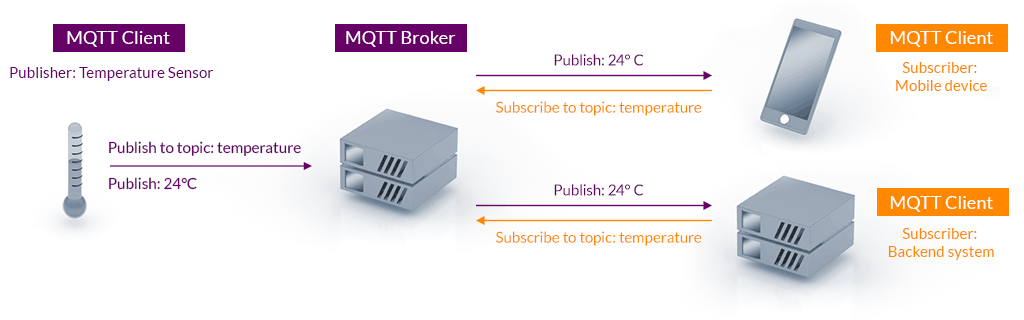
The MQTT client can be any program or device that implements the MQTT protocol. Clients connect to a server that handles all message passing, where each client is identified by a unique client ID. A client can publish messages that other clients may be interested in and likewise subscribe to request messages that it is interested in receiving.

Clients are decoupled by design and do not communicate directly with each other. All communication is brokered by a server component which sits in between clients and handles the routing of messages. This decoupling is the foundation of MQTT’s efficient one-to-many capability.

Server

An MQTT server (also commonly “broker”) is responsible for managing which clients are subscribed to which topics, receiving messages published on a particular topic and forwarding that message to any client subscribed for updates. When the connection between a client and server is lost, the server is also responsible for caching the message and delivering it to the client when the connection is re-established.

The server handles security implementation. For example clients can be required to authenticate or to connect using TLS. The server can also restrict access to topics using general rules, or even making rules for specific client IDs.

A demonstration of the MQTT architecture

Topics

All communication in MQTT is grouped into topics. Clients can publish messages to topics and subscribe to receive messages from others. A topic can be any string and is intended to group subjects of common interest, for example, sensor updates would be published to a topic. Topics are hierarchical, which means you will typically see topics structured as level1/level2/level3 where the slash acts as a separator for the levels. Topic subscriptions support wildcards, a powerful and convenient feature.

A subscription using a single-level wildcard (+) will result in a subscription that matches any topic that contains an arbitrary string in place of the wildcard. Subscribing to a topic such as level1/+/level3 means you will be subscribed to level1/foo/level3, level1/bar/level3 etc.

The multi-level wildcard (#) covers multiple topic levels and must be the last character in the topic. Subscribing to the topic level1/# would result in a subscription to level1/foo , level1/bar/baz etc. Essentially the subscription matches any topic that begins with the pattern preceding the wildcard character. As you may have guessed, subscribing to just # creates a subscription to all topics.

Reliability

Many clients connect to servers over unreliable networks, which necessitates the ability to recover gracefully from network outages and other such failures. This is what MQTT’s quality of service (QoS) addresses. QoS functions as an agreement between the message sender and receiver that defines the level of delivery guarantee for a specific message. The protocol defines three levels of quality of service.

  • QoS 0: at most once delivery – messages can be lost and neither client nor server take any additional steps to confirm delivery.
  • QoS 1: at least once delivery – messages are confirmed and re-sent if necessary. As messages may be delivered more than once, the receiving client should be able to handle duplication.
  • QoS 2: exactly once delivery – messages are confirmed and re-sent until they are received by the subscriber exactly once. This level is suitable for scenarios where neither message duplication nor loss is acceptable.

Note that the QoS defined by a publisher and subscriber may differ. The publishing client might publish its message using QoS 2 while the subscribing client defines QoS 1 for its subscription. This poses no issues, as the server will simply use the QoS defined by the recipient to deliver the message.

A higher QoS level comes with the cost of higher overhead. This along with the tolerance for data loss and duplication are important factors to take into account when choosing the appropriate level for your use case.

Implementations

A large number of both proprietary and open source MQTT server implementations are available. You will also find that readily available MQTT client libraries exist for many popular programming languages (Python, Java, JavaScript, C#). Development-oriented readers may check out for example mqtt.js and aiomqtt, both of which make getting a client up and running a breeze.

MQTT does not define a payload specification. This affords the implementing party immense freedom, with the valuable benefit of flexibility to transfer payloads between older and newer systems. On the other hand it can prove a challenge in terms of ensuring compatibility between clients, as communication is essentially based on silent agreements.

Conclusion

This has been a short introduction to MQTT and has hopefully provided insight into why it has become the de facto messaging protocol for IoT and M2M environments. We’ve learned about the the concepts of clients, topics and servers in MQTT in an effort to give you a head start in understanding the protocol’s messaging architecture. A brief look at the levels of quality of service gave us an understanding of how the protocol approaches the issue of reliability in communication.

We’ve seen that MQTT is commonly used in IoT and M2M contexts, but it need not be pigeonholed into those few contexts only. The versatility of potential use cases is one of MQTT’s many appealing features. The protocol is ideal for both small hobby projects and larger-scale applications. Due to the protocol being payload agnostic, the structuring of your payloads will play a large role in whether MQTT is a suitable tool for your needs.

Sources

MQTT Version 5.0. Edited by Andrew Banks, Ed Briggs, Ken Borgendale, and Rahul Gupta. 07 March 2019. OASIS Standard. https://docs.oasis-open.org/mqtt/mqtt/v5.0/os/mqtt-v5.0-os.html. Latest version: https://docs.oasis-open.org/mqtt/mqtt/v5.0/mqtt-v5.0.html.
https://mqtt.org/assets/img/mqtt-publish-subscribe.png
https://www.hivemq.com/blog/mqtt-essentials-part-5-mqtt-topics-best-practices/#heading-what-are-mqtt-wildcards-and-how-to-use-them-with-topic-subscriptions
https://www.hivemq.com/blog/mqtt-essentials-part-6-mqtt-quality-of-service-levels/
https://groups.oasis-open.org/higherlogic/ws/public/document?document_id=49028
https://www.hivemq.com/blog/mqtt-essentials-part-1-introducing-mqtt
Enginering at Meta: Building Facebook Messenger

Kestävä ux-suunnittelu, kuvituskuva

The era of sustainable UX design: a perspective on designing responsible digital products

Designing digital products has a relatively short history. Since the advent of graphical user interfaces in the 1980s and the widespread availability of computers, the design of digital products has focused on the users rather than the machines that implement them. For the last 40 years or so, the industry has been guided by the principles of user-centred design. But is the era of user-centred design now over?

In this blog post, I talk about sustainable UX design, and why we should move from user-centred design to sustainable design. I will also explain what it means in practice.

What is sustainable UX design?

The environmental impact of digital products is more difficult to understand than that of physical products. We all know that it takes cotton to produce a t-shirt, which in turn takes a huge amount of water to grow. But do we think about how much energy it takes to charge the online shop where we order the t-shirt? Or what difference does it make whether we order the shirt directly to our doorstep or to the nearest parcel machine? A single download may seem insignificant, but when we are talking about tens of thousands of daily visitors to a website, the energy consumption is significant.

…the internet – including data centres, telecoms networks, and end user devices like phones and laptops – uses a lot of electricity. In fact, if you add it all together, the internet uses roughly the same amount of electricity as the UK, one of the world’s largest economies.

– Tom Greenwood, founder of Wholegrain Digital and author of Sustainable Web Design

The European Climate Pact website claims that emissions from digital technologies in the EU are comparable even to those from aviation. In focusing on satisfying users’ needs, we may have overlooked the wider impact of the products we design.

Sustainable UX design is when the design process takes into account the impact of the product on the environment and people (i.e. beyond the users of the product). While user-centred design aims to meet the needs of users as much as possible and create a pleasant experience for them, sustainable design aims to create products that have a minimal impact on the environment and are fair and equal to users. In the sustainable design process, environmental impact, fairness and equality weigh more than meeting users’ needs and preferences. Fortunately, these are not necessarily mutually exclusive, but can contribute to each other.

Accessibility and equality are part of sustainable design

Sustainable UX design takes into account social impacts in addition to environmental impacts. The principles include making products not only accessible, but also equitable and ethical – in other words, they put the well-being of users and all people before the company’s profit. Sustainable design could therefore be considered responsible design.

Digital products should not make unfair assumptions or reinforce existing stereotypes and prejudices. Designers can influence this from the very beginning of the process, for example by recruiting participants from different backgrounds for user research. When designing user interfaces, the designer should pay attention to factors such as the illustrations and icons they use. For example, does a handshake icon necessarily need to have cufflinks?

An ethically designed product prioritizes the well-being of users over the company’s objectives. For example, is it worthwhile to design a product that users will spend as much time with as possible? Or could it have an impact on users’ mental health or sleep quality? Increasing conversions is often a goal for companies, but it can also encourage designers to use so-called deceptive or dark patterns. Deceptive design, as the name suggests, misleads users to act in the company’s interest, for example by manipulating the user’s emotions or by deliberately making it difficult for them to make a choice that is unfavourable to the company. While such practices may seem effective in increasing conversions, for example, they often pay off in the long run in terms of user dissatisfaction and poor brand loyalty.

Environmentally conscious design

There are always additional actors (human and non-human) involved besides our users — directly or indirectly. We must stop designing solely for our users and instead always understand and review our work within the systemic context.

– Thorsten Jonas, founder of Sustainable Design Network

Digital products always “live” in a context and their impact extends beyond their users. Responsible designers also take into account the indirect effects of the decisions they make, both on users and on other stakeholders. Let’s take Uber and Bolt as examples. What impact will the increased use of these applications have on the use of public transport and therefore emissions? How can users be encouraged to make more environmentally friendly choices, such as electric cars or carpooling? Or how important is it that drivers keep their cars idling while waiting for passengers? Designers cannot endlessly consider the impact of products, because they also need to get something done. But it is essential for a designer to have the ability to question things. Ultimately, design decisions have an impact not only on the environment but also on society.

Probably the most obvious way to improve the environmental performance of a digital product is to influence its energy consumption and the source of the energy it consumes. For example, we can favour data centres powered by renewable energy. The energy consumption of a product can be influenced by the use of colours, font choices and efficient design that requires fewer server requests and the processing of large amounts of data. In general, dark colours consume less energy than light colours. However, this is only true for modern OLED displays, and even on those, the greatest impact is achieved when the brightness of the display is set to maximum. According to an article in ZDNET, Google has done some research and reports, for example, that Google Maps night mode has reduced screen power consumption by 63% compared to normal mode.

The designer can also make a significant contribution to product sustainability by guiding users to make more responsible choices. At its simplest, this can take the form of information sharing with the user. In the e-commerce ordering example I presented earlier, the most environmentally friendly delivery method could be set as the default choice for all users.

A further way to ensure eco-friendliness is to consider the devices on which the digital product will be used. As a rule of thumb, we should design products that also work with old equipment, so we are not contributing to electronic waste.

Artificial intelligence and responsibility

Especially at this moment, when we are exploring the possibilities of AI in the design of digital products, it is important to pay attention to responsibility and sustainability. AI is known to suffer from biases and to draw the wrong conclusions when interpreting historical data. We need to actively work to address such ethical challenges. AI has the potential to improve energy efficiency and reduce environmental damage in many sectors, such as agriculture and construction. Nevertheless, the use of AI itself requires significant energy, so the incorporation of AI-based features into products needs to be carefully considered.

A widely used, but absolutely valuable example of the detrimental consequences of design decisions, particularly in relation to AI, is social media applications. We live in a polarised society where people find it difficult to tolerate views that differ even slightly from their own. Content recommendation algorithms on social media are wrapping users ever more tightly in their own bubbles.

Stand out from the competition with sustainable UX design

Investing in sustainable design can also be seen as a branding exercise. As mentioned, accessibility is part of sustainable design and accessible products are available to a wider audience than non-accessible products. Sustainably designed products and the communication of the process can appeal in particular to environmentally aware users, thus strengthening the brand’s position in their minds. The same applies to users who value fairness and equality.

User-centricity in UX design is still important and the principles behind it should not be forgotten. However, at Identio we have started to pay more attention to the sustainability and responsibility of the products we design. Our design principles include a section on “Sustainability” and our designers have created a sustainable design checklist to support their work. We want to play our part in building a more sustainable and better digital future, and we believe that sustainability is also an important value for many of our customers and an asset for success in the marketplace.

Sources:
Tom Greenwood – 20 ways to make your website more energy efficient – Wholegrain Digital
European Climate Pact – Going digital – good or bad for the climate?
Thorsten Jonas – The 11 principles of Sustainable UX – SUX – The Sustainable UX Network
Emilyann Gachko – Sustainable UX Design: Principles and Practices for Eco-Friendly Digital Products
Nielsen Norman Group – Deceptive Patterns in UX: How to Recognize and Avoid Them
World Economic Forum – AI and energy: Will AI reduce emissions or increase demand?


Read also: UI and UX – what is the difference between them?