Category: Technology

Mitä on ohjelmistoarkkitehtuuri?

What is software architecture and why is it important?

Software powers almost every aspect of our everyday life. For businesses aiming to create their own software, understanding the foundational concepts is crucial. One such fundamental concept is software architecture. But what is software architecture?

The software industry itself has long struggled to precisely define software architecture. There is a famous quote by a computer science professor and writer Ralph Johnson that is often used to depict software architecture: “Architecture is about the important stuff…whatever that is.” and in my opinion this is probably the simplest, yet accurate answer one can give. If we want to open this idea a bit more, let’s look into different aspects of software architecture.

The software architect role has responsibilities on a substantial scale and scope that continue to expand. Earlier the role has been dealing with solely technical aspects of software development, like components and patterns, but as architectural styles and software development in general has evolved the role of software architecture has also expanded. Constantly changing and emerging architecture styles such as microservices, event driven architecture and even the use of AI, lead the architect to the need for a wider swath of capabilities. Thus, the answer to “What is software architecture?” is a constantly moving target. Any definition given today will soon be outdated. In software development change is the only constant. New technologies and ways of doing things are emerging on a daily basis. While the world around software architects is constantly changing, we must adapt and make decisions in this shifting environment.

Generally speaking, software architecture is often referred to as the blueprint of the system or as the roadmap for developing a system. In my opinion the answer lies within these definitions, but it is necessary to understand what the blueprint or the roadmap actually contain and why the decisions have been made.

What does software architecture mean?

To get to the bottom of what software architecture actually contains and what should be analyzed when looking at an existing architecture, I like to think about software architecture as a combination of four factors or dimensions: the structure of a system, architecture characteristics, architecture decisions and design principles.

The structure of a system refers to what type of architecture is being used within the software, for example vertical slices or layers, microservices or something else that fits the need in a particular case. Just describing the structure of a system does not, however, give a whole picture on the overall software architecture. Knowledge of architecture characteristics, architecture decisions, and design principles are also required to understand the architecture of a system or what the requirements for the system are.

Architecture characteristics are aspects of software architecture that need careful consideration when planning overall architecture of a system. What are the things that the software must do that are not directly related to domain functionality? These are often described as the non-functional requirements, as they do not directly need knowledge of the functionality of the system yet are needed for the system to operate as required. These contain aspects like availability, scalability, security and fault tolerance.

The next piece in the puzzle is the architecture decisions. As implied by the name, these define the rules that specify how a system should be built and what is allowed and what is not. Architecture decisions create the boundaries within which the development team must work and make their decisions related to the development work. A simple example would be to restrict direct access to databases for different services and allow access only through an API. As we are embracing the change, these rules will be challenged, and careful consideration of trade-offs should always be conducted when discussing changes to the architectural decisions.

The final dimension in software architecture is design principles. These can be thought of as guidelines for the development work and not as set rules that must be followed. For example, if setting an architecture decision cannot cover all cases and conditions, a design principle can be set to provide a preferred method of doing things and give the final decision to the developer for the specific circumstance at hand.

Why is software architecture important?

It depends. Everything in architecture is a trade-off, which is why the answer to every architecture question ever is “it depends.” You cannot (or well, should not) search Google for an answer to whether microservices is the right architecture style for your project, because it does depend. It depends on the initial plans you have for the software, what the business drivers are, what the allocated budget is, what the deadline is, where the software will be deployed, skills of the developers, and many many other factors. The case for every single architecture case is different and each faces their own unique problems. That’s why architecture is so difficult. Each of these factors need to be taken into consideration when tackling an architecture case and for every solution, trade-offs need to be analyzed to find the best solution for your specific case.

Architects generally collaborate on defining the domain or business requirements with domain experts, but one of the most important result is defining the things the software must do, that are not directly linked to functionality of the software. The parts we earlier mentioned as architecture characteristics. For example, availability, consistency, scalability, performance, security etc.

It is generally not wise to try to maximize every single architectural characteristic in the design of a system, but to identify and focus on the key aspects. Usually, software applications can focus only on a few characteristics, as they often have impact on other aspects. For example, an increase in consistency, could cause decrease in availability; In some cases, it can be more important to show accurate data instead of inaccurate, even if it means parts of the application would not be available. In addition, each characteristic to be focused on increases the complexity of the overall design, which forces trade-offs to be made between different aspects.

Architectural planning is all about the trade-offs in different approaches. To determine which are the optimal solutions for the case at hand and understanding why applications should be built in a specific way and what it means, is what makes software architecture so valuable.

Types of architecture

When designing software, there is a plethora of architectural patterns available, each with its own strengths and weaknesses. Some of the most common types include:

Monolithic Architecture: A single, unified codebase where all components are tightly integrated. It’s simpler to develop initially but can become a burden as the software scales. While it offers straightforward development and deployment, maintenance can be challenging when the application grows, as even minor changes may require rebuilding and redeploying the entire system.

Microservices Architecture: This divides the software into small, independent services that communicate with each other. Each service handles a specific function and can be developed, deployed, and scaled independently. This architecture is great for scalability and flexibility but requires careful management of communication between services and adds complexity as the system grows.

Layered Architecture: A traditional approach where the system is divided into layers, such as presentation, business logic, and data access. Each layer handles specific tasks, making it easier to manage and test. However, it may become rigid and harder to adapt for complex or rapidly evolving systems.

Event-Driven Architecture: Focused on responding to events (e.g., user actions, data updates), this pattern is useful for systems that need to be highly responsive. It enables real-time processing and scalability but requires careful design of event flows to avoid bottlenecks or data inconsistencies.

Serverless Architecture: A cloud-based approach where the application’s backend runs on-demand without needing dedicated servers. It reduces operational costs and simplifies scaling but is highly dependent on third-party cloud providers, which could lead to vendor lock-in.

Each type of architecture comes with trade-offs, and the best choice depends on your business drivers, development team, deadlines, budget and many other factors. For example, startups might opt for monolithic or serverless architectures for faster time-to-market, while large enterprises may prefer microservices to handle complex, large-scale systems.

Possibilities and challenges

Possibilities

A well-planned software architecture opens up numerous opportunities for your business:

  • Customizable Solutions: Tailor the software to meet unique needs and adapt to changing demands. For example, modular architecture allows specific features to be added or upgraded without affecting the entire system.
  • Faster Market Entry: Modular architectures, like microservices, enable faster deployment cycles and iterative improvements. This can help businesses roll out features quickly to stay ahead of competitors.
  • Integration: Seamlessly connect with other tools, platforms, and APIs. This is especially important for businesses looking to integrate with third-party services, such as payment gateways, CRM systems, or analytics platforms.
  • Innovation: With the right architecture, your business can experiment with emerging technologies like artificial intelligence, integrating them into existing systems with minimal disruption.
  • Team Expertise: With well-planned architecture that fits the skills of the development team, development work, onboarding and delivering a quality product becomes easier.

Challenges

However, there are also challenges to consider:

  • Initial Complexity: Designing well-thought-out architecture requires expertise and time. Teams need to anticipate future needs while ensuring current requirements are met, which can be difficult without experience.
  • Cost: The upfront investment in architecture planning can be significant, though it’s often worth it in the long run. Costs include hiring experienced architects, acquiring tools, and potential delays in the project timeline during the planning phase.
  • Evolving Technologies: Staying up to date with new tools and frameworks can be overwhelming. The technology landscape changes rapidly, and businesses must ensure that their chosen architecture doesn’t become obsolete or incompatible with future advancements.
  • Team Expertise: Implementing complex architectures like microservices or event-driven systems may require specialized skills. Without proper training or hiring, teams may struggle to deliver a high-quality product.

By working with experienced developers or consultants and regularly reviewing architectural decisions, these challenges can be mitigated. The right approach ensures your software remains robust, adaptable, and aligned with your long-term goals.

Summary

Software architecture is often referred to as the blueprint of the system or as the roadmap for developing a system. Often the answer lies within these definitions, but it is necessary to understand what the blueprint of the roadmap actually contains and why the decisions have been made. The why is more important than how.

While precisely defining software architecture is difficult, it can be seen as a combination of four factors: the structure of a system, architecture characteristics, architecture decisions and design principles.

In the end architectural planning is all about the trade-offs in different approaches. To determine which are the optimal solutions for the case at hand and understanding why applications should be built in a specific way and what it means, is what makes software architecture so valuable.


Read also: Systems thinking in software development – mastering complex systems

MQTT architecture

MQTT: the lightweight IoT messaging protocol explained

MQTT is a publish/subscribe messaging protocol that allows for communication between any program or device that implements the protocol. It is lightweight, open, simple, and designed so as to be easy to implement. These characteristics make it ideal for use in Internet of Things (IoT) and Machine to Machine (M2M) contexts, typically constrained environments where a small code footprint is required and/or network bandwidth is at a premium.

We recently used MQTT as the main driver for communication in a project where we developed a kind of home automation platform. MQTT facilitated communication between a web UI, a number of microservices and PLCs and we have been delighted with how well the system has worked.

The goal of this post is to provide a quick introduction to MQTT’s core architecture and concepts. We will consider the topic of security outside the scope of this post (though some features are mentioned in passing), but I will say it is very much at the forefront in the design of MQTT and provides a number of means to make your implementation secure.

A brief history of MQTT

MQTT started off as a proprietary protocol in 1999. It was used by IBM internally until they released MQTT 3.1 as a royalty-free version in 2010. MQTT has been an OASIS standard since 2013 and the specification is managed by the OASIS MQTT Technical Committee.

The protocol’s swiftness, simplicity, efficiency and scalability – both in and of itself but also compared to other protocols – have not gone unnoticed and over the years it has been widely adopted and is generally used in environments where real-time access to data from devices and sensors is critical. Use cases would include for example smart homes, transportation and manufacturing, but notably even Facebook has used the protocol in their Messenger app.

But where does the name come from?

The “MQ” in “MQTT” originally referred to the IBM MQ product line, where it stands for “Message Queue”. IBM referred to the protocol by the name “MQ Telemetry Transport” in the version 3.1 specification we mentioned above. Looking up MQTT on the internet today, you will find that the four letters are often expanded to “Message Queuing Telemetry Transport”. While this name is relevant from a historical standpoint, the Technical Committee agrees that at least as of 2013 “MQTT” does not stand for anything.

MQTT Architecture basics

Client

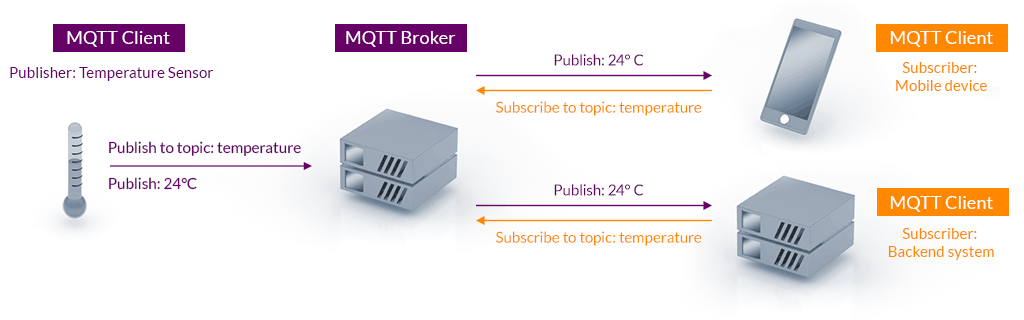
The MQTT client can be any program or device that implements the MQTT protocol. Clients connect to a server that handles all message passing, where each client is identified by a unique client ID. A client can publish messages that other clients may be interested in and likewise subscribe to request messages that it is interested in receiving.

Clients are decoupled by design and do not communicate directly with each other. All communication is brokered by a server component which sits in between clients and handles the routing of messages. This decoupling is the foundation of MQTT’s efficient one-to-many capability.

Server

An MQTT server (also commonly “broker”) is responsible for managing which clients are subscribed to which topics, receiving messages published on a particular topic and forwarding that message to any client subscribed for updates. When the connection between a client and server is lost, the server is also responsible for caching the message and delivering it to the client when the connection is re-established.

The server handles security implementation. For example clients can be required to authenticate or to connect using TLS. The server can also restrict access to topics using general rules, or even making rules for specific client IDs.

A demonstration of the MQTT architecture

Topics

All communication in MQTT is grouped into topics. Clients can publish messages to topics and subscribe to receive messages from others. A topic can be any string and is intended to group subjects of common interest, for example, sensor updates would be published to a topic. Topics are hierarchical, which means you will typically see topics structured as level1/level2/level3 where the slash acts as a separator for the levels. Topic subscriptions support wildcards, a powerful and convenient feature.

A subscription using a single-level wildcard (+) will result in a subscription that matches any topic that contains an arbitrary string in place of the wildcard. Subscribing to a topic such as level1/+/level3 means you will be subscribed to level1/foo/level3, level1/bar/level3 etc.

The multi-level wildcard (#) covers multiple topic levels and must be the last character in the topic. Subscribing to the topic level1/# would result in a subscription to level1/foo , level1/bar/baz etc. Essentially the subscription matches any topic that begins with the pattern preceding the wildcard character. As you may have guessed, subscribing to just # creates a subscription to all topics.

Reliability

Many clients connect to servers over unreliable networks, which necessitates the ability to recover gracefully from network outages and other such failures. This is what MQTT’s quality of service (QoS) addresses. QoS functions as an agreement between the message sender and receiver that defines the level of delivery guarantee for a specific message. The protocol defines three levels of quality of service.

  • QoS 0: at most once delivery – messages can be lost and neither client nor server take any additional steps to confirm delivery.
  • QoS 1: at least once delivery – messages are confirmed and re-sent if necessary. As messages may be delivered more than once, the receiving client should be able to handle duplication.
  • QoS 2: exactly once delivery – messages are confirmed and re-sent until they are received by the subscriber exactly once. This level is suitable for scenarios where neither message duplication nor loss is acceptable.

Note that the QoS defined by a publisher and subscriber may differ. The publishing client might publish its message using QoS 2 while the subscribing client defines QoS 1 for its subscription. This poses no issues, as the server will simply use the QoS defined by the recipient to deliver the message.

A higher QoS level comes with the cost of higher overhead. This along with the tolerance for data loss and duplication are important factors to take into account when choosing the appropriate level for your use case.

Implementations

A large number of both proprietary and open source MQTT server implementations are available. You will also find that readily available MQTT client libraries exist for many popular programming languages (Python, Java, JavaScript, C#). Development-oriented readers may check out for example mqtt.js and aiomqtt, both of which make getting a client up and running a breeze.

MQTT does not define a payload specification. This affords the implementing party immense freedom, with the valuable benefit of flexibility to transfer payloads between older and newer systems. On the other hand it can prove a challenge in terms of ensuring compatibility between clients, as communication is essentially based on silent agreements.

Conclusion

This has been a short introduction to MQTT and has hopefully provided insight into why it has become the de facto messaging protocol for IoT and M2M environments. We’ve learned about the the concepts of clients, topics and servers in MQTT in an effort to give you a head start in understanding the protocol’s messaging architecture. A brief look at the levels of quality of service gave us an understanding of how the protocol approaches the issue of reliability in communication.

We’ve seen that MQTT is commonly used in IoT and M2M contexts, but it need not be pigeonholed into those few contexts only. The versatility of potential use cases is one of MQTT’s many appealing features. The protocol is ideal for both small hobby projects and larger-scale applications. Due to the protocol being payload agnostic, the structuring of your payloads will play a large role in whether MQTT is a suitable tool for your needs.

Sources

MQTT Version 5.0. Edited by Andrew Banks, Ed Briggs, Ken Borgendale, and Rahul Gupta. 07 March 2019. OASIS Standard. https://docs.oasis-open.org/mqtt/mqtt/v5.0/os/mqtt-v5.0-os.html. Latest version: https://docs.oasis-open.org/mqtt/mqtt/v5.0/mqtt-v5.0.html.
https://mqtt.org/assets/img/mqtt-publish-subscribe.png
https://www.hivemq.com/blog/mqtt-essentials-part-5-mqtt-topics-best-practices/#heading-what-are-mqtt-wildcards-and-how-to-use-them-with-topic-subscriptions
https://www.hivemq.com/blog/mqtt-essentials-part-6-mqtt-quality-of-service-levels/
https://groups.oasis-open.org/higherlogic/ws/public/document?document_id=49028
https://www.hivemq.com/blog/mqtt-essentials-part-1-introducing-mqtt
Enginering at Meta: Building Facebook Messenger

Web Applications: How We Build Minimum Lovable Products in 2025 – Launching the Product

In this third part of the blog series on Minimum Lovable Products, we delve into the lifecycle phase where the “minimum” in MLP has been achieved, and you are at the point where the product should be launched, developed further, and/or maintained in production.

Once the minimum lovable product has been built and perhaps already in use, it is time to build on the minimum to reach a more fleshed-out product with increased technical robustness and all the nice-to-have features that were skipped during the initial development.

Depending on the product, the focus might be on ensuring that a one-and-done product is stable and maintainable for the rest of its lifecycle or, as more often is the case, continuing the development and building on the lovable foundation of the product.

Launching the product

If you’ve read our earlier posts, the initial development process has heavily involved its different users, and with a lovable product, these users can be your best ambassadors for the software. This may come in the form of expanding the adoption of the product in a business setting or as early adopters of a consumer application.

While many business decisions at this stage are technical in nature, scalability deserves some special attention. If your product becomes successful, you’ll need to address infrastructure challenges. “Under the hood” issues like load balancing and increased data volumes can slow down response times, potentially eroding the lovability that worked so well with your test group. These are common software challenges, but when you’re banking on lovability, even minor UX disruptions can damage your reputation with crucial early users. Whether through word of mouth or direct experience with a new tool, poor first impressions are particularly difficult to overcome.

There is also a chance that the user testing that yielded the lovable end result might have had some unrealized bias that doesn’t reflect the wider real-world user groups. Here you have to have your fingers on the pulse and find out if the user test representation is a feasible user group in the real world or if you need to pivot somehow — what are the lovable and unlovable things about your product; what can be salvaged and what should be scrapped.

Maintaining lovability and developing it further

Lovability is a context-specific quality. When software reaches the maintenance stage of its lifecycle, it should be clear what the lovability is actually based on. This might mean “under the hood” technical aspects such as fast service times, which would prompt special care to the infrastructure upkeep and scalability.

Technical debt is a tricky thing that, when unchecked, can stack up in an exponential manner and become a blocker in development. This means that you might not be able to ship new updates and features on a desired schedule. Here you have to keep in mind what makes your product lovable: at what point will shortcuts taken in initial production come back to haunt you in a big way? It might very well be worth it to change that quick and dirty database implementation to a distributed, scalable system if it means your lovable product won’t fold over if and when your lovable software gathers traction beyond the initial user base of early adopters. On the other hand, a lovable product might gather eager users demanding new features, and delays may infuriate some users. Examples of this occurring are often found in the games industry.

Often, however, it is the UX that might go through some changes with continuous development. With the case of an ever-developing software product, there is a temptation to add more and more features for different use cases or connections to different outside services. The bloat can be an issue that dilutes the lovability of the UX, devolving a slick and simple UI to a swamp of elements and options. However, additional features may well be what the users want or need. There are ways of integrating new elements without compromising the lovability. Depending on the case, this might mean customizable UI for the user or separating less used features to optional views.

Even with the temptation to add more features, one should also take into consideration whether they can be added as lovable features. If the main features of your product are crafted with design, love, and care, a clunky feature will stick out like a sticky spacebar in a keyboard. On the other hand, there are business decisions to be made: are the features worth the clunkiness? There certainly are cases where a solid core product and fluid basic use cases make the product worth using, even if there are some more tedious but seldomly used features.

The path forward

Often, minimum lovable products are aiming for growth. There are many ways to achieve this, but each option has pitfalls and requirements. Keeping the app lovable is in itself a business decision that involves costs but also might help you retain the competitive edge. In the cases where you are building software for a predetermined use case, such as a public transport ticket and route service, the decision whether or not to emphasize the lovability and ease of use in continuous development affects the lives of your users and, by extension, can be the best reference of your work quality.

In closing

Building lovable products, even minimum ones, is a commitment of time and effort. Software craftsmen may be tempted to preach that MLPs should be the starting point of every software product, as building nice things is often more appealing to them.

The truth is, however, that sometimes the quick and dirty solutions or disregarding the polishing may be the most effective option, such as in cases where the users will not care about the UI visuals but just want to get the job done. MLP is not the solution to every software you’re going to build, but whenever the case is that you have to win users over and retain them, switching the mindset to building a lovable product might be the right choice.

With the end of this series, we hope to have provided you with insights regarding efficient product development in a lovable fashion. If you’ve read through these all, we think you might benefit from getting in touch with us to evaluate whether or not we might be able to help you deliver something lovable to your users.


Part 1: Web Applications: How We Build Minimum Lovable Products in 2025 – Gaining a Solid Understanding
Part 2: Web Applications: How We Build Minimum Lovable Products in 2025 – Building a Lovable App
Part 3: Web Applications: How We Build Minimum Lovable Products in 2025 – Launching the Product

Systeemiajattelu ohjelmistokehityksessä – Systems thinking in software development

Systems thinking in software development – mastering complex systems
We are living in the age of systems, where the complexity of these systems is constantly increasing, and problems are becoming more holistic, impacting entire structures rather than isolated parts. Solving complex issues requires more than just straightforward, linear thinking. We need the ability to think broadly, to understand relationships between elements, and see that often-referenced “bigger picture.” While linear thinking is a useful starting point, it often isn’t enough. Systems thinking introduces a new perspective for examining problems and finding solutions.

Systems thinking is not just a skill to be learned—it is a set of practices and perspectives. In fact, it could even be considered a way of life. It cannot be fully grasped by reading alone, much like you can’t learn to play golf simply by reading about it. It must be experienced and practiced. Systems thinking demands that we truly seek to understand.

Linear thinking

Many of us think linearly without even realizing it. This approach is so deeply ingrained that we don’t recognize it as just one of many possible ways of thinking. Linear thinking is predictable and based on specific, often learned, procedures. It sounds appealing—especially in a field like software development, where the goal is often to construct modular and highly efficient components that fit neatly into a larger system.

Linear thinking is indeed a useful and efficient approach in many situations. It provides clarity and control, which are especially valuable for software designers in their work. However, when we begin to consider more complex systems and the relationships between their parts, it becomes essential to broaden our approach to thinking.

The shift towards systems thinking

Designing complex systems is challenging, and the problems that arise increasingly affect the entire system and become more multifaceted, making linear thinking insufficient to achieve the best possible outcome. Solving system-level issues requires new perspectives and tools.

Let’s consider a simplified example. If we plant seven seeds, we expect to harvest seven fully grown plants after x days. If a deer eats one of the plants, we build a fence to prevent further damage and proceed to harvest the remaining crop. This is how we often approach software project planning as well.

In reality, things are not this simple. Sometimes, we end up with nine plants because they may continue to grow into the following year. Other times, there may be no harvest at all. The cause could be rabbits, deer, too much rain, a lack of it, or even excessive cold. The outcome is almost always a combination of many factors, interacting with each other in unpredictable ways.

Since systems are rarely fully controllable and their behavior is often unpredictable, we cannot approach more complex scenarios by thinking solely in a linear way.

Systems thinking requires effort – but it is worth it

Unfortunately, nonlinear approaches are almost always more difficult than linear ones. Systems thinking doesn’t make life easier, but it makes you more effective. It enhances your ability to tackle tough challenges, improves decision-making quality, and helps you identify what the real problems are, versus what are merely symptoms of something else. Through systems thinking, you can find and focus on the true signal amidst all the noise.

In systems thinking, however, it’s about more than just solving problems. At its core, it’s about understanding—the ability to grasp the entire context in which the problem occurs. This requires continuous learning, and most importantly, an awareness of how much you still don’t know. One of the most valuable qualities of a systems thinker is the recognition that they don’t know everything.

How to recognize a systems thinker?

A good systems thinker recognizes the strengths and weaknesses of linear thinking and knows when to apply a linear approach and when to view things from the perspective of the entire system.

In systems thinking, it is important to recognize that technical and social systems are almost always intertwined. One must understand the context in which they operate and how technical solutions and the people involved interact with each other, striving to view the situation from multiple perspectives.

The most important feature of systems thinking is the ability to continuously learn and adapt. A good systems thinker is also self-reflective and aware of their own mental models, reactions, and potential misjudgments. In systems thinking, the goal is to increase awareness of one’s own thinking and help teams and organizations understand how shared processes, patterns, and decisions impact the system as a whole.

A few characteristics of a systems thinker:

  • Thinks about thinking.
  • Understands and recognizes the properties of both linear and nonlinear thinking, and knows how to choose the best approach for each situation.
  • Can design solutions that take into account the context and the needs of the entire system.
  • Understands that people are part of technical systems.
  • Is able to seamlessly switch perspectives when searching for solutions.
  • Always strives to improve their own skills.
  • Can understand and identify root causes of system-level problems and solutions.
  • Can communicate and, most importantly, justify ideas and change proposals.
  • Can understand how interdependent and interconnected parts create wholes, and how to best leverage these dependencies.
  • Can create well-founded models and concepts to support decision-making.
  • And above all, accepts that uncertainty is welcome, natural, and an inevitable part of life.

Software developers as part of a system

Software is not just technical; it is, in fact, a socio-technical system. In short, the way we think, communicate, and work is closely tied to how software evolves. When both the technical and social components of a system work well together, the system often becomes greater than the sum of its parts.

If we want to improve a software system, we must first identify how the team working on the software thinks about it and, if necessary, work to change that mindset. The integrity of the system—how well both the technical and non-technical parts work together—is crucial. When ideas and concepts are aligned at the system level, the systems serve their purpose more effectively. Small changes in mindset can lead to significant improvements in the software system.

When this integrity is lacking, we encounter issues such as data silos, inefficiencies in cross-team collaboration, quick fixes, software incompatibility, and technical debt, all of which hinder the development and maintenance of the system.

Relationships are system design

In systems thinking, understanding relationships is key. A software system only becomes a system when its components interact with each other. Three separate microservices in the cloud are not yet a system; these software components only transform into a system when there are dependencies and relationships between them.

Similarly, a development team can be considered a system when its members work together and have relationships that support a shared goal.

Linear approaches, where strategy comes from the top and teams simply execute it, are insufficient in a complex, systemic world. Organizations must understand that changes affect different parts of the system in different ways, and that the success of change depends on our ability to design and build effective relationships within the system.

Strategic changes, such as digital transformation, modernization, or even the shift from a monolithic software architecture to microservices, cannot be a top-down process because the change itself is not linear. If such a change is approached only with linear thinking, the path will be long and rocky, and the outcome is unlikely to result in anything truly sustainable. While the process may be completed, it’s likely that the system after the changes will not be very functional.

In summary, systems thinking is not easy, but it is essential for success in complex, nonlinear environments. By learning to view situations from the perspective of the entire system and understanding the context, we can create sustainable solutions that best serve both technical and social goals.

A bright, abstract illustration with a large black-and-white gear, purple plant shapes, and swirling lines on a yellow background. The title reads "Minimum Lovable Products in 2025 – part 2.

Web Applications: How We Build Minimum Lovable Products in 2025 – Building a Lovable App

When we feel we have sufficient understanding of the people we’re working with, the problem we’re solving and the people who will be using the product, we’re ready to get started. We like to build software products for our clients in an iterative way.

Previously, we have figured out the things that have the highest priority for the success of the product and the most challenging technological issues we have to face in order to get there. We don’t tackle these straight away, but rather begin our investigation while setting up the wireframe for our client.

Picking the Right Technologies

We’ll always consider what existing software services the client is running currently. Especially if we’re integrating into some existing services. When we’re building products for the web, especially from a starting point of zero, we think at this moment Next.js is the best starting point.

We’re usually pretty agnostic when it comes to technology. Pick the technology for the right project and the right use case is a common mantra in software engineering that we like to abide by and even in zero-to-one product development, there are special cases where you might argue for a better selection.

Next.js gives you a lot out of the box thanks to its vast templating library supported by its developer Vercel. When we’re building a preliminary version of the product, we want to focus on delivering the critical features that make your product valuable and highly usable at the time of the launch. We’ve worked with Next.js on multiple projects with great results that allow us to focus on solving the clients problems, rather than spending time in the choice of technology.

Other technical choices

Most software products that matter require a database that we tend to pick based on your business requirements. For the most common approach, we’ll recommend an SQL database like PostgreSQL for its good set of features and operational excellence. There’s only the rare case where Postgres does not provide your initial product with what you’re looking for.

Alternatives to Next.js

We have experience working with both SvelteKit and Remix, which provide equally lucrative starting points through good template selection. Next’s number of ready templates is generally larger and allows us with a better selection of alternatives.

Some clients might have stronger opinions in terms of selection and there are some special cases where other technologies give you a better starting point through better integration to your existing software.

Building something Lovable

A lovable product is the extra effort that differentiates your product from the competitors or makes your users adopt the new product without complaints. Going the extra mile from MVP to MLP means designing user flows to be simple and intuitive. The first iteration should be simple and focused; additional features can be added later.

A classic MLP example in the software sphere is the dating app Tinder; the swiping right or left UX is widely regarded as the feature that set it above the rest and has even become a commonly used term for (dis)agreeing or (dis)liking things. Adding functionality to connect Spotify, instagram and such while nice features, surely weren’t the main focus when the dating app was in it’s infancy. The main goal is to build a functional solution to a user need; not just a technically plausible way of doing it, but an enjoyable one.

We can circle back to our earlier explanation of a Minimum Lovable product to emphasize our point.

Minimum Viable Product

  • Rudimentary proof of concept-level skeleton.
  • Simple feature set to appease requirements.
  • Allows users to test an idea but usually lacks traction.

Minimum Lovable Product

  • All of the above.
  • Fleshed out User Experience in terms of primary workflows.
  • Evokes positive emotions in the user.

What does development look like

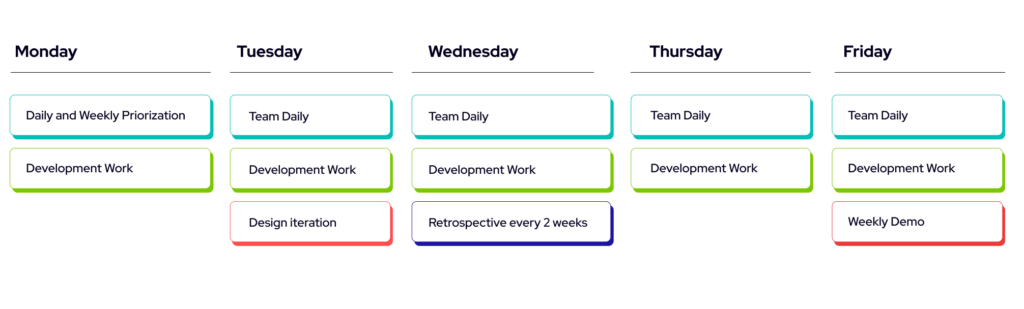
When the development has begun, we aim to have a clear line of discussion with the client throughout the process. The team discusses with the client to set up regular rituals on a weekly or bi-weekly basis to figure out how to prioritize development and receive regular feedback to make sure we’re going in the right direction.

We like to highlight the need of getting something usable to the client as soon as possible. This allows us to get started with user-testing from the early stages of a a project as well. When we have a tangible product for the client and the users to preview, it’s more likely we’re focusing on the right features during this important phase in the product’s infancy.

When we’re building something from the previously described user-focused mindset, having a feedback loop becomes even more crucial. While we work with the regular toolset of Kanban boards and agile frameworks, we rarely build things in the format of sprints to keep things as flexible as possible.

This does not mean we’ll avoid backlogs and estimations all-together, but the fast paced iteration often benefits from a shorter iteration-loop with the client and the users.

Changing course

Sometimes, during the development process, we might find out that some things are not doable within the current scope of the delivery. At these points, it’s important to indicate the issues early so we can make the required changes in a way that keeps the spirit of the product alive and allows the client to still reach our goals. After all, we’re building lovable products here so it usually is more beneficial to postpone a feature that can’t be delivered in a lovable state rather than diluting the overall quality of the product by implementing an immature feature that is not crucial to the use case. Alternatively, a lovable but temporary crutch could be implemented, provided that it can be replaced later on with a technically robust one without changing the things that are going to make the product lovable.

Summary

In this second part we’ve discussed in a bit more detail about our choice of technologies and the concrete development cycle how we make the most of the time spent delivering the product.

We think it all comes down to a few things:

  • Keeping an open channel of communication during the development phase.
  • Selecting the right technologies for the right job.
  • Iterating over something tangible and remaining open for change.
  • Getting the users involved early.

In the third part, we’ll look a bit more at what happens and how things might change once our MLP is out in the real world.


Part 1: Web Applications: How We Build Minimum Lovable Products in 2025 – Gaining a Solid Understanding
Part 2: Web Applications: How We Build Minimum Lovable Products in 2025 – Building a Lovable App
Part 3: Web Applications: How We Build Minimum Lovable Products in 2025 – Launching the Product

How we build minimum lovable products in 2025 – Gaining Understanding

Web Applications: How We Build Minimum Lovable Products in 2025 – Gaining a Solid Understanding

Be warned. This 3-part article will be rather opinionated, and you might disagree with some of our choices and approaches. That’s fine! We’ve found from working with our clients that certain technological and operational selections will make things run smoother. Feel free to disagree with them and let us know what your team likes to do differently!

At Identio, we work with a mix of clients in the private and public sectors at different stages of their lifetime. We feel like the approach described here can be relatively easily adapted to different clients but works best for early-stage startups or businesses with a small amount of existing software services that they wish to integrate into a new product. This series explores the concept and the development process of a minimum lovable product (MLP), a concept that aims to deliver not just technically functional software but also the kind that users enjoy using.

We’ve split this article into three parts that will be released a week apart, going from the preliminary information gathering phase to the delivery of the Minimum Lovable Product to the next steps taken once the first version of the product is in the hands of your users.

The Minimum Lovable Product

To give a brief introduction to the uninitiated, an MLP is a product that has been developed and designed to the point where users will eagerly adopt its use. The easiest way to explain the difference in our definition is to provide some comparison between a Minimum Lovable Product and the more familiar Minimum Viable Product.

Minimum Viable Product

  • Rudimentary proof of concept-level skeleton.
  • Simple feature set to appease requirements.
  • Allows users to test an idea but usually lacks traction.

Minimum Lovable Product

  • All of the above.
  • Fleshed out User Experience in terms of primary workflows.
  • Evokes positive emotions in the user.

By definition, MVP gets the job done, but often software products fail to get users, or the users are begrudgingly using the tools in lieu of alternatives. When the user experience affects the users greatly or the aim is to reach a wide user base, it is worth putting in the extra effort to transform viability to lovability.

Before we begin

There’s usually a few weeks’ period at the beginning of product development where we spend time researching and discussing details like contracts. We start the learning process as part of the sales process, but we really get to know the client at the beginning of the delivery in kick-offs or design sprints.

Understanding the Client

We like to know our clients and their business well. Knowing the team or teams you’re working with, what domains they are working in, and what their day-to-day business is like. For early-stage startups, this usually boils down to meeting the team and learning about who they are and what their expertise is.

Building the first version of a product is often at its core communicating clearly and understanding the what and why of the problem we’re looking to solve. We think it’s important to include the client in the development process early on. A transparent exchange of information makes things easier down the line.

Understanding the Product Vision

Once we’ve got a clearer understanding of the client, it’s time to dig deeper into the problem. Our teams are at their best when they work at the crossroads of business problems and technical solution development.

After meeting the client’s people, we dig deeper into the actual problem we’re trying to solve, usually based on the client’s description. We do our best to make sense of the following things:

  • Why is the client interested in building this product to solve a problem?
  • Why is the client specifically interested in solving the problem?
  • Why are they looking to solve the problem right now?

Getting the answers to these questions allows us to narrow down the scope of the first iteration of the product. We usually want the first version to provide a subset of the final product’s functionality, so we can deliver something usable, testable, and lovable for the users.

Understanding the Users

Only on the rare occasion is the client the direct user of the product, and understanding just the client might be enough. Although we might even get a very clear understanding of the users from the client, it still usually pays to spend some time understanding the different groups of users we will be working with. This might mean creating example user personas, their needs, and use cases. Getting real potential users involved with the initial use case definition is greatly beneficial. Having a user-centered approach requires an ongoing dialogue with the intended users to focus on the problem that requires solving and avoiding designing a solution that doesn’t address the root issue at hand.

Boiling down to the most fundamental issue at hand might also reveal different needs and use cases for different user segments. Understanding them will also help to decide whether to focus on one segment or if the different use cases can be catered to without compromising the user experience and, by extension, the lovability of the product.

Focusing efforts on the Right Things

Now that we have a better understanding of the problems we’re looking to solve, we can focus our efforts on the right things:

  • Which features are a priority to the user
  • Which things need to be tested out first

With user-focused priorities, you can focus on how to bring these features to life: What is required for the use case or user flow to be fluid and intuitive? What has to work for the user flow to function as intended? What requires UI elements and interaction, and what can happen under the hood? Answering these questions usually leads to mapping out more complex technical issues that might need solving and gives you the framework from which to build upon in possible future development.

Summary

The initial phase of delivering an MLP contains a lot of work that gives us a better understanding of what our client wants to build and why. This process continues throughout the development work, and we often work in iterations based on our best understanding that grows over time.

Here’s a short list of things we look into at the beginning of a product delivery:

  • Understanding the client: understanding the client’s background, their previous efforts, and why they’re focused on tackling a problem with a software product.
  • Understanding the problem: who it concerns, why it needs fixing, and what previous work exists to tackle this issue.
  • Understanding the users: why the users are concerned with this problem, what kind of user groups are involved, and how the product fits into their existing workflows.
  • Understanding the priorities: making sense of what features in the product are crucial to tackle the problem, understanding which solutions are most important for the users, and finding the difficult challenges we should be concerned with from the beginning.

Next: Work in Progress

In the next part, we’ll go a bit deeper into the Work in Progress phase, where we start building the solution for the problem: The Product. We’ll provide some insights as to which technologies we think work well for these kinds of product deliveries, and we’ll provide an outline for how the development process looks like.


Part 2: Web Applications: How We Build Minimum Lovable Products in 2025 – Building a Lovable App
Part 3: Web Applications: How We Build Minimum Lovable Products in 2025 – Launching the Product

React Native vs Flutter cover

React Native vs Flutter – FAQ

The time for websites with messy UIs that deliver the bare minimum a user asked for has been over for a while and the same can definitely be said for mobile applications. Today, users want top-notch apps that are easy to use, fast and reliable – and give them no more and no less than what they promise. Needless to say delivering these kinds of apps does not come in the snap of a finger nor with the smallest of cost. Coming to aid companies and organizations are cross-platform frameworks. They shorten the development cycle from design to delivery and thus decrease the costs as well. 

Now you might ask “should I even go cross-platform”. That’s another topic for another day, but for the sake of this blog let’s answer yes. Going cross-platform means that an app can be developed for Android, iOS and often also for the web using a single codebase. This means that there’s a strong possibility that design, development and even testing will require less time and less money than when going native.

The following question usually is “what cross-platform framework is the best”. Let’s dive in to the two most used ones to get you an answer.

What are my top two choices?

React Native and Flutter – they are some of the most used mobile frameworks for building cross-platform mobile apps. They’re both open-source, support a single codebase for Android and iOS, and include a hot reload feature that will speed up both development and testing.

What is React Native?

Released in 2015 by Meta’s Facebook, React Native is an open-source mobile app framework that uses native components of each platform giving apps native look and feel. Under the hood, React Native uses JavaScript and JSX (the latter allows writing HTML in React) which means developers who are familiar with JavaScript can usually learn it rather quickly. React Native also has a large developer community behind it. Apps such as Discord, Instagram and Pinterest have been developed using it.

What is Flutter?

Released in 2017 by Google, Flutter is an open-source mobile framework that uses Google’s own object-oriented language called Dart. Its developer community has been growing rapidly and on StackOverflow’s online survey of 2023 it bypassed React Native in the “Most popular technologies of the Other frameworks and libraries category”. Apps such as Google Pay, Etsy and Phillips Hue have been developed with Flutter.

How difficult are React Native and Flutter to learn?

As of now Google’s Dart language has no other popular use cases than Flutter so a developer without experience with it will have a completely new language to learn in a Flutter project. However, the experience of our consultants at Identio is that the learning curve with Dart isn’t as steep as it might seem. I also need to point out that the syntax of Dart is similar to JavaScript so a developer who can read JS can probably read at least 90% of Dart as well. Google has also put a lot of effort into providing comprehensive and easy-to-understand documentation, in addition to a swift project setup.

“We had a workshop at Identio about learning Flutter. About ten of us without previous experience gathered for a weekend, and everyone had a running app at the end of it.”

– Julius Rajala, Software Engineer

To compare, a developer who has experience with ReactJS is likely to learn the ropes of React Native quite quickly and most likely you have developers who’ve used ReactJS or at least JavaScript. But the documentation pales in comparison to Flutter in both structure and content. 

Regarding documentation the point definitely goes to Flutter but all in all I’d still give a point for React Native for an easier learning experience.

Any differences regarding building the app UI?

React Native comes with about 25 UI components. Any features that cannot be built with them will need to either be implemented using third party libraries or by writing them from scratch. Using third party libraries can lead to compatibility issues and the latter is expensive. However, React Native is considered stable for using third party packages for things like payment handling or geo-location and there’s a wide range of actively maintained libraries to choose from. And as mentioned, React Native uses native components which is always an optimal route since native components are built exactly for the specific platforms and devices. An example of a native component is the camera app.

Flutter, on the other hand, includes a comprehensive UI component library as it’s integrated with Google’s Material Design. Developers can expect smooth sailing when it comes to compatibility if the UI can be built using just that. However, options with third party libraries are not as broad than with React Native if there’s a need for anything else. The advantage here is that the Material Design library is well designed and answers to the needs of most modern apps. An app could even be designed using FlutterFlow (read our blog about it here) meaning that the design would use these built-in UI components making implementation quite straightforward.

Which has better performance?

Due to its efficient compilation Dart does offer better performance so Flutter takes the lead here. However, the impact for the user isn’t that significant that you should choose Flutter only for the improved performance. Due keep it in mind though.

Which is easier to maintain?

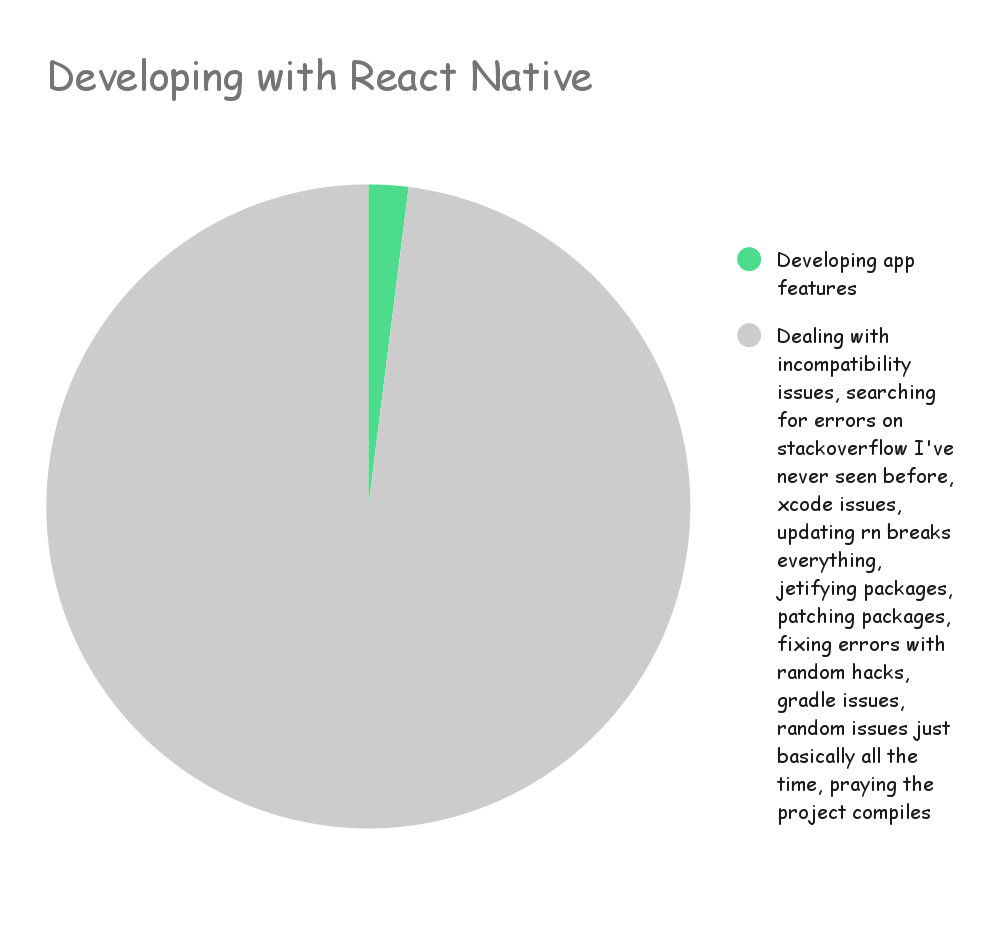
Now with maintenance it’s like they say “with great power comes great responsibility” but here it’s “with third party libraries comes headache”. Jokes aside, using third party libraries means you need to trust that those libraries are being maintained as well in order to prevent security and compatibility issues, and you must keep tabs on when they have been updated and if those updates keep that library compatible with your app. This goes for both Flutter and React Native. If we then don’t consider the use of third party libraries, the experience this writer has is that for maintenance, React Native loses a point because updating React Native itself can be a wild experience and a developer responsible for it will benefit from having steady nerves. Something almost always breaks and debugging the broken update isn’t usually swift at all.

Developing with React Native

What about bugs and app updates?

Let’s consider here that your app uses the most common form of delivery – the app stores. Then delivering app updates is the pretty much the same for both Flutter and React Native. The differences are most likely visible in debugging and testing so they won’t be visible to your users but rather to your developers. Flutter has integrated testings features while React Native has no official testing framework using frameworks like Jest instead.

Any other things to consider when choosing between React Native and Flutter?

Well, as a fair warning we might never know if a framework will cease to exist so going native is in that way the safest of options. This doesn’t mean that cross-platform is a bad choice. React Native has been here for almost a decade now and some of the most popular apps in the world have been developed with it. Flutter on the other hand has Google behind it and Google can be said to not have the best track record with giving long-time support for their technologies, but Flutter’s future has been looking very promising.

Which one suits my needs best?

Totally depends on your needs here. What’s your budget and timeline? Do you have a design ready already? Who will be working on the app? Depending on your app’s functionalities the differences between developing it with React Native or with Flutter might be either significant or insignificant. What I can promise is that you will get a working app with either, the road to that just might be different. If you have difficulties deciding do ask from people or companies with more experience. 

Writer’s notes

As React Native might be more familiar to many of you readers, me and my colleagues thought it would be good to shake things up and point out that there is another great option out there – Flutter. I’ve myself used React Native more and despite its faults still enjoy working with it, but I cannot say I’m biased and can definitely see the opportunities Flutter offers. Hopefully with any future decisions Flutter is taken into consideration as well and the framework is chosen with the app and the developer in mind!


Also read: FlutterFlow – App Development Without Coding

""

Testing in Microservices: Ensuring Quality and Reliability

In the intricate world of microservices architecture, where systems are composed of small, independent services working together, testing plays a big role in ensuring the quality, reliability, and resilience of the overall system. As we navigate through the final part of our microservices blog series, we delve into the realm of testing. Testing in microservices brings its own set of unique challenges and considerations, requiring specialized approaches and tools to validate the intricate communication and behavior of these distributed components.

In this concluding segment, we explore various aspects of testing within a microservices ecosystem. We’ll dive into different types of tests, ranging from unit testing to end-to-end testing, contract testing to security testing, and more. By understanding and implementing effective testing strategies, you can gain confidence in the stability, performance, and security of your microservices.

Unit Testing

Unit tests are the smallest test we have, testing a single unit. A unit can often be a method or a set of methods working closely together. Our engineer Konsta wrote an excellent blog post about unit tests, which be found here (In Finnish).

In short, By thoroughly testing units in isolation, developers can identify bugs, catch regressions and validate the logic within each microservice. Unit tests enable early detection of issues, promote faster development iterations, and enhance the overall quality and maintainability of microservices-based applications. Furthermore, Unit tests should be cheap to execute and have fewer dependencies than any other tests in our projects.

Integration Testing, or is it?

Integration tests, also known as service tests, are a fundamental aspect of software testing that ensures smooth collaboration and integration among multiple microservices. Unlike unit tests that assess individual units of code, integration tests should evaluate the interactions and dependencies between services. By simulating the behavior of external dependencies using mocks and stubs, these tests more closely replicate real-world scenarios and identify issues that may arise in production environments.

Let’s consider an example where we have an e-commerce application consisting of several services: a product catalog service, a shopping cart service, and a payment service. The integration tests for this scenario would aim to verify that these services communicate correctly and that the overall functionality of the e-commerce system is intact.

To accomplish this, developers employ various techniques, including the use of mocks and stubs. Mocks simulate the behavior of external dependencies, such as a third-party payment gateway, allowing developers to control and verify interactions with these dependencies during testing. Stubs, on the other hand, provide predefined responses to simulate certain service behavior. By utilizing mocks and stubs, integration tests can replicate real-world scenarios, even if certain dependencies or services are unavailable during testing.

For our e-commerce example, an integration test might involve simulating the flow of adding products to a shopping cart, proceeding to the checkout process, and verifying that the payment service is appropriately invoked to complete the transaction. The integration test would validate that all services are interacting correctly, that the necessary data is passed between them accurately, and that the expected outcomes are achieved.

Most often Integration tests are written so that we test a single service at a time, mocking the other services to isolate the single service for faster testing and easier CI/CD processes, where a pipeline does not have to spin up multiple services for every new push.

It’s important to note that while integration tests with mocks and stubs may not replicate the exact behavior of real services, they provide a valuable alternative in situations where fully spinning up all services for comprehensive integration testing is complex or impractical. By employing these techniques, developers can identify and address issues related to service communication, data inconsistencies, and the overall integration of microservices. To ensure the data between two or more services are as expected, we can utilize contract tests.

Contract Testing

Contract testing is a valuable technique used to ensure effective communication and integration between microservices. Contracts define the data structures and APIs that should be used to communicate between services, and contract tests verify that these specifications are being met. By employing contract testing, developers can validate that their microservices interact correctly and produce the expected results.

Let’s revisit our e-commerce example with the product catalog service, shopping cart service, and payment service. In this context, contract testing would involve defining the expected interactions and data exchange between these services. For instance, the contract might specify that the product catalog service should provide a list of available products, the shopping cart service should be able to add items to the cart, and the payment service should handle the payment process.

To conduct contract testing, developers would define the contract and create tests to verify that each service adheres to its obligations. For example, a contract test for the shopping cart service would ensure that it correctly consumes the product catalog service’s API to fetch available products and that it properly formats and sends requests to the payment service.

By employing contract testing in our e-commerce example, developers can identify any inconsistencies or compatibility issues between services early on. For instance, if a change in the product catalog service’s API breaks the expected contract, the contract tests would fail, highlighting the need for communication and resolution among the service teams.

A popular tool for contract testing is Pact. Using Pact, developers can define and manage contracts, generate contract tests, and execute them to validate the compliance of each service. Pact facilitates consumer-driven contract testing, where the consumer of a service defines the contract, ensuring that the service meets the expected behavior.

By incorporating contract testing into the testing strategy, developers can ensure that their microservices communicate effectively and efficiently. It helps minimize integration issues and promotes seamless collaboration among the services in the overall system.

In summary, contract testing is a crucial aspect of testing microservices-based applications. By defining contracts and conducting tests to validate service interactions, developers can ensure that their microservices communicate correctly, maintain compatibility, and deliver the expected results. Contract testing, exemplified in our e-commerce scenario, helps reduce integration issues and promotes effective collaboration between microservices.

End-to-End Testing

End-to-end testing, the true Integration test?

In the context of our e-commerce example, end-to-end testing involves testing the complete flow of data and interactions across the product catalog service, shopping cart service, and payment service. These tests simulate real user scenarios, from adding items to the cart to completing the payment, to ensure that the entire system functions correctly.

End-to-end tests provide a comprehensive assessment of the system’s functionality, ensuring that all microservices collaborate seamlessly and produce the desired results. They validate the integration between services in a production-like environment and instill confidence in the system’s overall performance.

It’s important to note that end-to-end tests can be time-consuming and challenging to set up, as they require a complete and functioning system environment. Therefore, they are typically executed as a final step in the testing process, serving as a validation of the system’s integrity before deployment.

While end-to-end testing offers valuable insights into the system as a whole, it may not be the most efficient approach for testing individual units or small components. Instead, it serves as a critical assurance step to verify that the integrated microservices function correctly and deliver the intended user experience.

Several tools are commonly used to conduct end-to-end tests in a microservices environment. Here are a few notable examples:

  1. Selenium: Selenium is a popular open-source framework for automating web browsers. It enables end-to-end testing by interacting with web elements, simulating user actions, and validating expected outcomes.
  2. Cypress: Cypress is a JavaScript-based end-to-end testing framework that specializes in testing web applications. It offers a rich set of features, including real-time reloading, automatic waiting, and easy debugging, making it a powerful tool for end-to-end testing.
  3. Puppeteer: Puppeteer is a Node.js library that provides a high-level API for controlling headless Chrome or Chromium browsers. It allows developers to automate browser actions, capture screenshots, and generate PDFs, facilitating end-to-end testing of web applications.
  4. TestCafe: TestCafe is a cross-browser testing tool that supports end-to-end testing for web applications. It provides an easy-to-use API, automatically handles multiple browsers, and allows for parallel test execution, making it suitable for comprehensive testing across different environments.
  5. Appium: Appium is an open-source framework for automating mobile applications. It supports end-to-end testing of native, hybrid, and mobile web apps across iOS and Android platforms, making it an essential tool for mobile application testing.
  6. Postman: While primarily known for API testing, Postman can also be used for end-to-end testing by simulating API interactions and validating responses. It offers a user-friendly interface, supports scripting, and allows for easy collaboration among team members.

In summary, end-to-end testing ensures that the entire system, encompassing all microservices, behaves as expected and meets user requirements. By simulating real-world scenarios, these tests validate the complete flow of data and interactions, providing confidence in the system’s functionality and readiness for deployment.

Performance Testing

Performance testing is a type of testing that evaluates the performance, scalability, and reliability of a microservices-based application. Performance testing involves simulating a realistic workload and stress-testing the microservices to identify bottlenecks, measure response times, and assess the system’s ability to handle increased loads. Tools and frameworks such as Apache JMeter, Gatling, and Locust can be used for performance testing in microservices architectures. Monitoring and analyzing performance metrics during load testing is also an important aspect of performance testing.

Each of these tools has its own strengths and weaknesses, and the choice of tool will depend on the specific requirements and constraints of the project. It’s important to select a tool that can handle the desired workload and provide accurate and actionable performance metrics.

Security testing

Security testing is a type of testing that focuses on identifying vulnerabilities and ensuring secure microservices. Security testing techniques include testing authentication, authorization, input validation, and data protection. There are tools and frameworks available for security testing in microservices architectures, and it’s important to incorporate security testing into the development and deployment pipeline to ensure that security issues are identified and addressed early on in the process.

In addition to identifying vulnerabilities, security testing can also help ensure regulatory compliance and protect against data breaches. With the increasing number of cyber threats and attacks, it’s important to prioritize security testing as a critical aspect of any microservices-based application.

When conducting security testing, it’s important to consider the various types of security threats that microservices are susceptible to, such as cross-site scripting (XSS), SQL injection, and cross-site request forgery (CSRF). By understanding these threats and employing appropriate security testing techniques, developers can ensure that their microservices are secure and resilient.

There are several tools and frameworks available for security testing in microservices architectures, including OWASP ZAP, Burp Suite, and Nessus, to name a few. These tools can help identify vulnerabilities and provide actionable insights for improving security.

Other Tests

There are many other aspects of testing, here are a few honorable mentions:

Canary Testing

Canary testing is a technique used to minimize the risk of deploying new code to production environments. By deploying new code to a small subset of users or servers, developers can test the code in a real-world scenario without affecting the entire system. Canary testing helps identify any issues or bugs that may arise from the new code and allows developers to roll back the changes if necessary.

Blue-Green Deployments

Blue-green deployments are a technique used to minimize downtime and risk during the deployment of new code to production environments. By maintaining two identical environments, one active (blue) and one inactive (green), developers can deploy new code to the inactive environment and test it thoroughly before switching the active environment to the new code. Blue-green deployments help ensure that the system is always available and that any issues with the new code are identified and resolved before the switch is made.

Observability and Monitoring Testing

Observability and monitoring are critical aspects of testing in a microservices ecosystem. By collecting and analyzing logs, metrics, and traces during testing, developers can identify and troubleshoot issues before they impact the system. Observability and monitoring tools such as Prometheus, Grafana, and Jaeger can be used to collect and analyze data during testing. Incorporating testing-related telemetry into overall observability practices can help ensure that the system is reliable and resilient.

Summary

Testing plays a crucial role in ensuring the quality, reliability, and resilience of microservices-based applications. This blog post explored various aspects of testing within a microservices ecosystem, including unit testing, integration testing, contract testing, end-to-end testing, performance testing, security testing, and other testing techniques such as canary testing and blue-green deployments. By understanding and implementing effective testing strategies, developers can gain confidence in the stability, performance, and security of their microservices-based applications.

Some additional important points about testing in a microservices ecosystem include:

  • Developers should aim to test their microservices in isolation as much as possible. This helps identify bugs and logic issues within each microservice early on.
  • Integration testing is a crucial aspect of software testing that ensures the proper collaboration and integration of microservices. By simulating real-world scenarios and identifying potential issues early on, developers can create reliable and cohesive systems.
  • Contract testing can be employed to facilitate testing communication between services. It helps to verify the expected data and aids in testing the communication and integration between services.
  • End-to-end testing provides a comprehensive view of the system by testing the flow of data and interactions between microservices in a production-like environment. These tests simulate real user scenarios and provide confidence that the system as a whole is functioning correctly.
  • Performance testing evaluates the performance, scalability, and reliability of a microservices-based application. It involves simulating a realistic workload and stress-testing the microservices to identify bottlenecks and measure response times.
  • Security testing is a type of testing that focuses on identifying vulnerabilities and ensuring secure microservices. Security testing techniques include testing authentication, authorization, input validation, and data protection.
  • Other important aspects of testing in a microservices ecosystem include canary testing, blue-green deployments, and observability and monitoring.

By incorporating these testing techniques and strategies into their development and deployment pipelines, developers can ensure that their microservices-based applications are reliable, scalable, and secure.

Postface

Thanks for reading through one or more of my microservice blog posts. It has been a journey and even I have learned a ton! We started going through the basics of microservices, then looked through how the ensure good communication between services. We touched on the topic of monitoring and observability and how important security is in software development. We ended with a long post about testing.

However, as I am only one person I cannot cover everything. Did I miss anything? Is there something that you think is still uncovered, in the world of microservices? I would love to hear from you.


Part 1: The Pros and Cons of Microservices: Is It Right for Your Project?
Part 2: Building a Robust Microservice Architecture: Understanding Communication Patterns
Part 3: The Importance of Monitoring and Observability in Microservice Architecture
Part 4: Securing a Microservice Architecture – 5 Pillars
Part 5: Testing in Microservices: Ensuring Quality and Reliability

""

Securing a Microservice Architecture – 5 Pillars

As microservices continue to gain popularity, it is important to consider the security implications of this architecture. A microservice architecture can bring many benefits in terms of scalability, maintainability, and flexibility, but it also introduces new security challenges. This blog post will explore the most important aspects of securing a microservice architecture, including the following things.

  1. Authentication and Authorization: How to ensure that only authorized users and services can access the microservices.
  2. Data Protection: How to protect sensitive data that is transmitted between microservices.
  3. Network Security: How to secure the network infrastructure that connects the microservices.
  4. Service Isolation: How to ensure that each microservice is isolated and protected from other services.
  5. Monitoring and Logging: How to monitor the system for security breaches and ensure that logs are being properly collected and analyzed.

By addressing these security concerns, we can ensure that our microservice architecture is secure and can be trusted to handle sensitive data and critical operations. If you haven’t read the previous parts of this miniseries I highly recommend you do that:

Part 1 – How to build a microservice
Part 2 – Microservice communication
Part 3 – Monitoring and Observability

Monitoring and Logging

Let’s quickly review what we went through in part 3; As we discussed, monitoring and logging are essential aspects of securing a microservice architecture. Proper monitoring and logging can help detect and respond to security breaches and other issues that may arise within the system.

To ensure proper monitoring, it is important to collect and analyze logs from all the microservices and their underlying infrastructure. This includes logs from the operating system, web servers, databases, and other components of the system.

In addition to logging, it is also important to set up metrics and alerts to monitor the health and performance of the microservices. This can help identify issues before they become security risks and ensure that the system is running smoothly.

Overall, monitoring and logging are critical components of securing a microservice architecture. By properly monitoring and logging the system, we can quickly detect and respond to security threats and ensure that the system is running smoothly. Read more about this in part 3.

Authentication and Authorization

Authentication is another crucial aspect of securing a microservice architecture. It ensures that only authorized users or services can access the microservices and their resources.

gRPC, a high-performance, open-source remote procedure call (RPC) framework, provides a built-in authentication layer that allows for secure communication between microservices. The gRPC authentication layer supports several authentication mechanisms, including Transport Layer Security (TLS) and Token-based authentication.

On the other hand, REST or other types of services may use other means of authentication, such as OAuth, JSON Web Tokens (JWT), or Basic Authentication. These authentication mechanisms require additional configuration and setup, but they can provide a secure and flexible way to authenticate users and services.

Regardless of the authentication mechanism used, it is important to implement proper authentication and authorization controls in each microservice. This includes ensuring that only authorized users and services can access the microservices and their resources, and that access controls are enforced at the API level.

Access controls at the API level

Moreover, it is important to choose an authentication mechanism that aligns with the needs of the microservice architecture and the security requirements of the system. By selecting the appropriate authentication mechanism and implementing proper authentication and authorization controls, we can ensure that our microservice architecture is secure and only accessible to authorized users and services.

Service Isolation

As the name suggests, service isolation refers to the practice of keeping individual services separated from one another, both logically and physically.

Logical Isolation focuses on minimizing the interdependence between microservices. Each service should be designed to have its own functionality and boundaries. One of the key benefits of logical isolation is to prevent unauthorized access. The principle of least privilege comes into play here, as each microservice should only have access to the data and resources it requires to perform its designated tasks. To achieve logical isolation, it is crucial to establish well-defined and granular APIs between microservices.

Physical Isolation focuses on the underlying infrastructure, separating resources or containers. By running its own isolated environment, vulnerabilities or breaches in one microservice are less likely to impact the security of other services. Docker is a popular choice to achieve physical isolation, as each microservice runs in its own container, which provides an additional layer of security.

When implementing service isolation, it is essential to have a good balance between security and operation efficiency. Too strict security and the might performance suffer, it will also increase complexity and increase the resource usage of each service.

Network security

Network security is a critical aspect of ensuring the protection and integrity of microservices. It involves implementing measures to secure the network infrastructure and communications between microservices. Key components of network security include firewall configuration, network segmentation, and intrusion detection and prevention systems. Firewalls act as a barrier, controlling and monitoring incoming and outgoing traffic. Network segmentation helps isolate microservices, limiting the potential impact of a security breach. Intrusion detection and prevention systems actively monitor network traffic for suspicious activities, detecting and mitigating potential threats. By implementing robust network security measures, organizations can enhance the overall security posture of their microservices architecture and protect against unauthorized access and data breaches.

Data protection

Data protection is of utmost importance when it comes to microservices. It involves implementing measures to safeguard the confidentiality, integrity, and availability of data within the microservices architecture. Encryption is a fundamental technique used to protect sensitive data both in transit and at rest. Access controls, such as authentication and authorization mechanisms, should be implemented to ensure that only authorized users or services can access and manipulate data. Regular backups and disaster recovery plans help protect against data loss and ensure business continuity. Additionally, monitoring and auditing mechanisms should be in place to detect and respond to any potential data breaches or unauthorized access attempts. By prioritizing data protection in microservices, organizations can maintain the privacy and security of their valuable data assets.

A few tips on securing your microservices

Here are a few tips and best practices when securing a microservice architecture:

  1. Role-based Access Control (RBAC): RBAC allows access control decisions based on roles and permissions, ensuring only authorized users or services can access microservices and resources. Pros: Flexible, scalable, and integrates with existing IAM systems. Cons: Complexity in implementation and maintenance for large architectures.
  2. TLS/SSL for secure communication: TLS/SSL encrypts and authenticates communication between microservices, securing data from unauthorized access. Pros: Provides secure data transmission and easy integration. Cons: Can impact performance and complex setup, especially in complex architectures.
  3. API Gateway: An API Gateway acts as an entry point, handling authentication, authorization, and other security tasks. Pros: Centralized security management, simplifies development and maintenance. Cons: Single point of failure and potential latency in communication.
  4. Containerization and Orchestration: Docker and Kubernetes offer security benefits like isolation and easy deployment, scaling, and management. Pros: Additional security, simplifies deployment and management. Cons: Complexity and maintenance challenges, especially in large systems.

By implementing these tips and best practices, we can ensure that our microservice architecture is secure and can be trusted to handle sensitive data and critical operations.

API-Getaway design

Final words

As I am no security expert this part contains mostly general guidelines on securing software. Each technology requires too much configuration for us to cover in a single blog post. But here are some tips you can follow in your daily work:

  1. Implement services with a “need to know” basis. Don’t share data for the sake of sharing it.
  2. Secure your endpoints and limit the access to bare minimum, it’s easier to grant access than revoke access.
  3. Regularly update and patch software dependencies and libraries to address known vulnerabilities. Keeping your software up to date helps protect against known security risks and exploits.
  4. Follow secure coding practices, such as input validation, output encoding, and proper error handling, to prevent common security vulnerabilities like cross-site scripting (XSS) and SQL injection attacks.
  5. As a last one, Test your code!

The final part will be about testing. Until then!


Part 1: The Pros and Cons of Microservices: Is It Right for Your Project?
Part 2: Building a Robust Microservice Architecture: Understanding Communication Patterns
Part 3: The Importance of Monitoring and Observability in Microservice Architecture
Part 4: Securing a Microservice Architecture – 5 Pillars
Part 5: Testing in Microservices: Ensuring Quality and Reliability

The Importance of Monitoring and Observability in Microservice Architecture

Microservice architecture typically involves multiple services communicating with each other over a network, often using different technologies and protocols. This can make it challenging to keep track of what’s happening across the system and to diagnose issues when they arise.

Introducing Monitoring and Observability

Monitoring and Observability are two essential practices when working with software development as it helps teams keep track of the system’s performance and health. It can be difficult to detect problems without monitoring or observability in a timely manner and identify the root cause of system issues.

Monitoring is the practice of collecting data from a system and displaying it in an organized manner, such as through logs or dashboards. This can be useful for tracking system performance and diagnosing issues quickly.

Observability is the practice of collecting data from a system and then analyzing it for patterns and insights. This can be useful for understanding how the system is behaving and diagnosing deeper issues.

Together, monitoring and observability help teams ensure that their microservice architecture is running efficiently and effectively. Today cloud providers all have their own monitoring tools, which are easy to set up and integrate with other cloud services, especially if you are running your microservices in their cloud. Additionally, there are a number of open-source monitoring and observability tools available, such as Prometheus and Grafana. Regardless of the tools you use, monitoring and observability are essential for keeping your microservice architecture running smoothly.

Monitoring

One of the most utilized monitoring tools is logs. We all have written logs since they are easy to implement and work well for most use cases. However, logs alone are not always enough, especially in complex microservice architectures. That’s why there are also specialized monitoring tools that provide additional insights into your system’s health, such as metrics and tracing. These tools can help you quickly identify and diagnose issues, and ensure that your microservices are performing optimally.

When writing logs it’s good practice to follow some rules of thumb;

  1. Include relevant context: Log messages should include relevant information about what happened, when and the severity level of the given log. A log message can also include any relevant details about the event or error.
  2. Be consistent: When writing error messages, define a style you follow with your team(s) across the microservices. This will make them easier to read and understand. This will also make it easier to use other tools to find relevant information when needed.
  3. Avoid unnecessary information: Logs should only include relevant information, as too much data can make it difficult to find the information you need.
  4. Use structured logging: Structured logging involves formatting log messages as key-value pairs or JSON objects, making it easier to search and analyze log data.
  5. Store logs centrally: As mentioned above, cloud providers have easy-to-use tools for storing logs centrally so that they can be easily accessed and analyzed by the team. Other tools can be used, for example, ELK stack, Splunk or Graylog, to name a few.

You might wonder, what is relevant context, what styles can I use across microservices etc.
Here is an example;

[2023-05-14 10:30:00] INFO: User [623] login successful.
[2023-05-14 10:30:25] INFO: User [2531] login successful.
[2023-05-14 10:45:00] WARN: User [623] trying to checkout order [524] without items.
[2023-05-14 10:48:10] ERROR: Cannot update user [2531]: PSQL Duplicate key found ON column 'email' with value 'example@identio.fi'.

In the above example, we can clearly see when something happened, the severity and the log. In this example, our team has decided to use a standard for IDs, where they are encapsulated in brackets. i.e. [ID]. This helps us to decipher the messages faster, as our brains can quickly ignore these. In our error, we include information about what someone was doing when the error occurred, why it happened, and where the error is.

Side note: The error should probably be handled as it’s a validation error, and a system should not try to insert duplicate values into its database.

As an exercise I would like to encourage you to visit your logging system; Is there anything that can be improved?

An additional technique that ensures the health of your services is the use of metrics. When we talk about metrics, we are referring to a set of quantifiable measures or parameters that can be used to evaluate different aspects of your services. For instance, you can use metrics to track response times, error rates, and resource utilization. By analyzing these metrics, you can gain valuable insights into how your services are performing and identify areas that may require further optimization or improvement. Metrics can thus serve as an essential tool for enhancing the reliability and quality of your services, helping you to provide a better experience for your users while also mitigating the risk of outages, downtime, or other performance issues that could undermine your business operations.

Observability

As mentioned above, observability is the practice of collecting data, through monitoring, and then analyzing it for patterns and insights. A subject that touches on both monitoring and observability is tracing.

Tracing

Tracing involves tracking the flow of requests through a system and can help teams to identify issues with individual services or dependencies between services. Tracing is particularly important in microservices, where services may be distributed across multiple servers and networks. Tracing provides a way to visualize the behavior of the system and can help to identify bottlenecks and other deeper issues.

One simple technique that can be used to aid in tracing is to include a unique identifier in each log message that is related to a specific request or transaction. This identifier can be used to correlate log messages across multiple services, providing a trace of the flow of a request through the system. For example:

[2023-05-14 10:30:00] INFO: REQ[256]: User [623] login successful.

In addition to adding unique identifiers to log messages, there are also specialized tools that can be used to implement tracing in a microservice architecture. These tools, known as distributed tracing systems, allow teams to visualize the flow of requests through the system and to trace issues across multiple services. Some popular distributed tracing tools include OpenTelemetry, Jaeger, and Zipkin.

Alerts

Another way to ensure the health of your system is to implement alerts. Alerting involves setting up notifications to alert teams when certain conditions are met (such as a service becoming unresponsive or a spike in error rates). Effective alerting is critical to ensuring that issues are identified and addressed quickly before they can impact users or other parts of the system.

When implementing Alerts, here are some tips to keep in mind:

  1. Define clear thresholds: Alerts should be triggered when certain conditions are met, such as a CPU usage exceeding a certain percentage or an error rate increasing beyond a certain threshold. These thresholds should be clearly defined and based on the requirements of the system.
  2. Use multiple notification channels: Alerts should be sent through multiple notification channels, such as email, SMS, and chat, to ensure that team members are notified in a timely manner.
  3. Prioritize alerts: Not all alerts are created equal. It’s important to prioritize alerts based on their severity and impact on the system so that team members know which alerts to respond to first.
  4. Use actionable alerts: Alerts should provide clear information about what action needs to be taken, such as restarting a service or rolling back a deployment.
  5. Create runbooks: Runbooks are documents that provide detailed instructions for responding to specific alerts. Creating runbooks can help ensure that team members know what steps to take when an alert is triggered.
  6. Test alerts regularly: Alerts should be tested regularly to ensure that they are working as expected and that team members are receiving notifications.
  7. Analyze alert data: Alert data can provide valuable insights into the health of the system. By analyzing alert data over time, teams can identify patterns and trends that may indicate underlying issues that need to be addressed.

By following these tips, teams can ensure that alerts are effective in helping them to identify and respond to issues in their microservices architecture.

Visualization

What happens when non-technical people want to understand a system? Or when the team wants to visualize the metrics of their system? Visualization is a great tool for presenting data about the system in a way that is easy to understand and interpret. Effective visualization can help you to quickly identify patterns and issues in the data and to make informed decisions about how to optimize performance and address issues.

There are several tools that can be used for visualization when implementing monitoring and observability in your microservice architecture. Here’s a list to name a few:

  1. Grafana: Grafana is an open-source platform for creating and sharing dashboards and visualizations. It supports a wide range of data sources, including popular Monitoring and Observability tools like Prometheus, Graphite, and Elasticsearch.
  2. Kibana: Kibana is an open-source data visualization platform that is often used with Elasticsearch. It provides a range of visualization options, including charts, graphs, and maps.
  3. Tableau: Tableau is a commercial data visualization platform that provides a range of advanced features for creating interactive dashboards and visualizations.

I have worked with Grafana myself, and it has been great! The learning curve isn’t that steep and the features it packs should work for any small to medium size project. However, when implementing visualization, there are several things to keep in mind:

  1. Choose the right visualization for the data: Different types of data require different types of visualizations. For example, time-series data may be best represented using line charts, while geographic data may be best represented using maps.
  2. Keep it simple: Visualizations should be easy to read and understand. Avoid cluttering dashboards with too much information, and use colors and labels judiciously.
  3. Provide context: Visualizations should include context that helps viewers understand the data being presented. This could include labels, titles, and annotations.
  4. Use interactive features: Interactive features such as drill-downs, hover-over tooltips, and filtering can help viewers explore the data and gain deeper insights.
  5. Update visualizations in real-time: Real-time updates can help teams respond quickly to changes in the system. Tools like Grafana and Kibana support real-time updates, allowing visualizations to be updated automatically as new data becomes available.

By following these best practices, teams can create visualizations that help them to gain insights into the behavior of their microservices architecture and to make informed decisions about how to optimize performance and address issues.

Summary

Microservice architecture can make it challenging to diagnose issues when they arise. Monitoring and observability are two essential practices that help teams keep track of the performance and health of a system. Monitoring involves collecting data from a system and displaying it in an organized manner, while observability involves collecting data and analyzing it for patterns and insights. Together, these practices help ensure that microservice architecture is running efficiently and effectively. Popular monitoring and observability tools include logs, metrics, tracing, alerts, and visualization tools like Grafana and Kibana. Subjects that we did not cover in this post are SLOs, SLAs, SLIs, and error budgets. These are concepts I suggest you explore on your own.


Resources:

Grafana
Kibana
Tableau
Prometheus

Learn about SLAs, SLOs, and SLIs.


Part 1: The Pros and Cons of Microservices: Is It Right for Your Project?
Part 2: Building a Robust Microservice Architecture: Understanding Communication Patterns
Part 3: The Importance of Monitoring and Observability in Microservice Architecture
Part 4: Securing a Microservice Architecture – 5 Pillars
Part 5: Testing in Microservices: Ensuring Quality and Reliability